
How to Optimize Google Business Profile for Local SEO in 2027
Your Google Business Profile helps people find your business on Google Search and Maps. But if the information is incomplete or outdated, potential customers may struggle to understand what you offer or how to reach you.
Optimizing your profile means making those details accurate, useful, and easy to find.
This guide explains what to improve, which features are worth using, and how to measure your results without chasing unnecessary SEO tasks.

Why Google Business Profile Optimization Matters
A Google Business Profile (GBP) displays important information about your business, including your services, location, opening hours, contact details, photos, and customer reviews.
For someone looking for a nearby business, these details can influence whether they call, visit your website, or choose another provider.
Google also uses Business Profile information to understand which local searches a business may be relevant to.
According to Google's local ranking guidelines, local results mainly depend on three factors:
Relevance: How closely your business matches what someone is searching for.
Distance: How far your business is from the searcher or the location mentioned in their search.
Prominence: How established or well-known your business appears to be.
You can improve the accuracy and relevance of your profile, but you can't control every ranking factor. Adding more information doesn't guarantee a higher position in Google Maps.
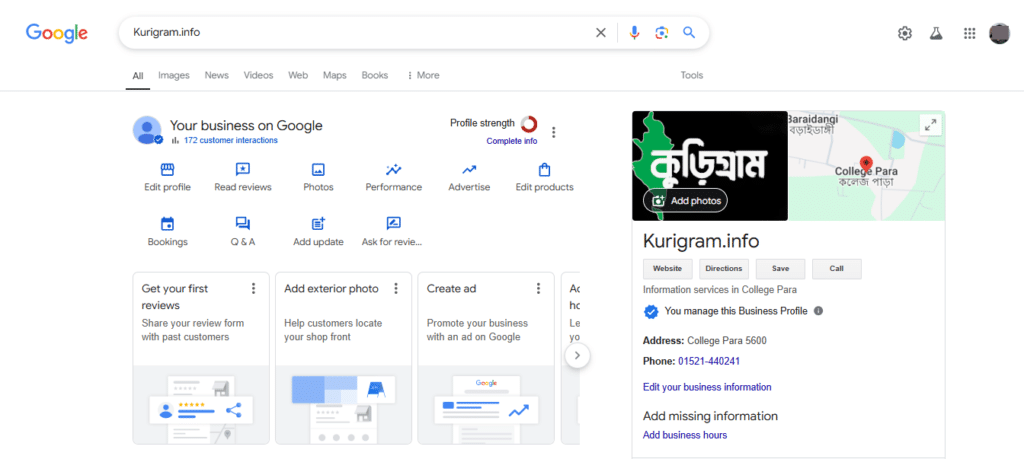
The goal is to help Google understand your business while giving customers the information they need.
1. Start With Accurate Business Information
Before uploading photos or publishing updates, review the basic information on your profile.
Sign in to the Google account that manages your business and open your Business Profile through Google Search or Maps.
Select Edit profile to review the available fields.
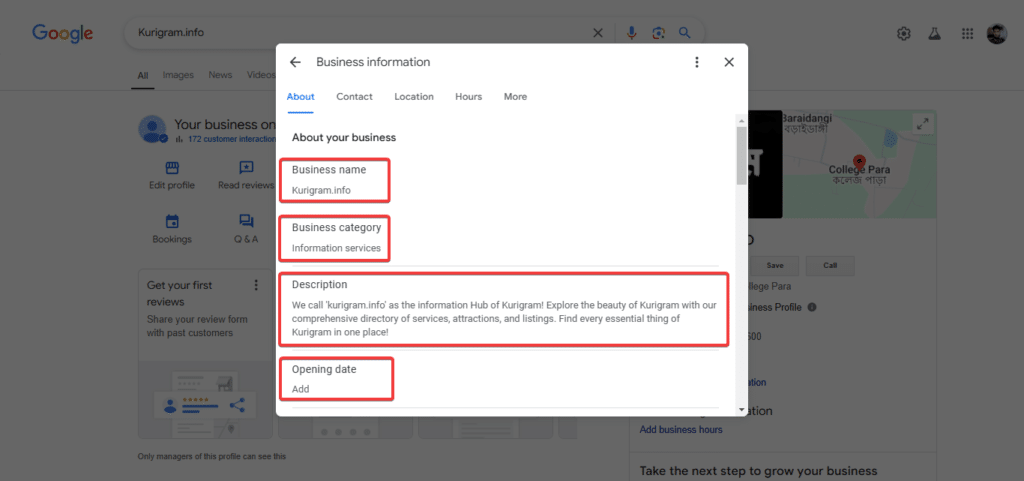
Start with your business name, category, address or service area, phone number, website, and opening hours.
These details may seem simple, but mistakes can create real problems.
Imagine a customer finding your business on Google Maps, following the listed address, and discovering that you've moved.
Or someone calls the number on your profile, only to find that it's no longer in service.
Keeping these details accurate is one of the most useful things you can do.
Use Your Real Business Name
Your profile name should match the name customers recognize from your actual business.
For example, if your company is called "Harbor Appliance Repair," use that name.
Don't change it to "Harbor Appliance Repair – Best Washing Machine and Refrigerator Repair Near Me" simply to include more keywords.
Google's business representation guidelines prohibit unnecessary information in business names, and violations can result in profile restrictions.
Check Your Address or Service Area
If customers visit your business at an eligible physical location, make sure the address and map pin are correct.
If you travel to customers and don't receive them at your business address, configure the profile as a service-area business and hide your private address.
For example, a mobile appliance repair technician who works from home shouldn't display that home address as a public storefront if customers don't visit it.
Instead, the business can specify the cities or areas it genuinely serves.
Adding more service areas doesn't automatically improve your rankings in those locations.
Choose the settings that reflect how your business actually operates.
Review Opening Hours
Check your regular opening hours and add special hours for holidays or temporary schedule changes.
If customers can only visit by appointment, make that clear through the appropriate settings and your website.
Google may also update business information based on information from other sources, so it's worth checking your profile regularly.
If you're creating a profile for the first time or connecting it through Wix, our Google Business Profile setup guide for Wix covers that process separately.
2. Choose the Right Business Category
Your primary business category is one of the most important details on your profile.
It helps Google understand what your business primarily does.
For example, suppose you operate a business that repairs household appliances.
You should select the most appropriate available category that describes your main activity, rather than a broad category related to selling appliances if repairs are your primary service.
Google also allows eligible businesses to add relevant secondary categories.
However, you shouldn't add categories simply because they contain popular keywords.
A useful way to choose a category is to complete this sentence:
"This business is a..."
If the category accurately describes your business, it may be appropriate.
If it only describes something your business occasionally offers, it might belong in the Services section instead.
You can review available categories through Edit profile → Business category.
Check these settings when your business changes its main services, but avoid changing categories repeatedly without a genuine reason.
3. Write a Clear Business Description
Your business description gives customers a short introduction to what you do.
Google allows up to 750 characters in this field.
You don't need to use every character or fill the description with keywords.
Instead, explain your main services, who you help, and what customers should know about your business.
Example of a Business Description
Consider a fictional mobile repair business:
"Harbor Appliance Repair provides washing machine, dishwasher, and refrigerator repairs at customers' homes. We diagnose common appliance problems, explain available repair options, and arrange appointments across our listed service areas."
This description tells customers what the business offers without making exaggerated claims.
Compare that with:
"Best appliance repair company offering top-rated, affordable, professional, number-one repair services near you."
The second version uses promotional language but provides little useful information.
Google's business description guidelines also prohibit website links and recommend focusing on business details rather than prices, promotional offers, or sales.
A clear, accurate description is more useful than trying to force every possible keyword into the field.
4. Add Your Services and Products
Your primary category describes the business as a whole.
The Services section gives you an opportunity to explain what you actually provide.
Depending on your category, Google may suggest services that you can add to your profile.
For example, an appliance repair company might list washing machine repairs, dishwasher repairs, oven repairs, and refrigerator repairs.
If a relevant service isn't available among the suggestions, Google may allow you to add a custom service.
You can manage these through Edit services in your Business Profile.
Make Service Descriptions Useful
For a service such as dishwasher repair, you might write:
"Diagnosis and repair of common dishwasher problems, including drainage issues, leaks, and faults affecting cleaning performance."
This is more useful than simply repeating the phrase "professional dishwasher repair."
Where available, you can also include pricing information.
If the cost depends on an inspection, don't invent a fixed price. Explain the actual pricing approach on your website instead.
Google's services management guide explains the available settings.
What About Products?
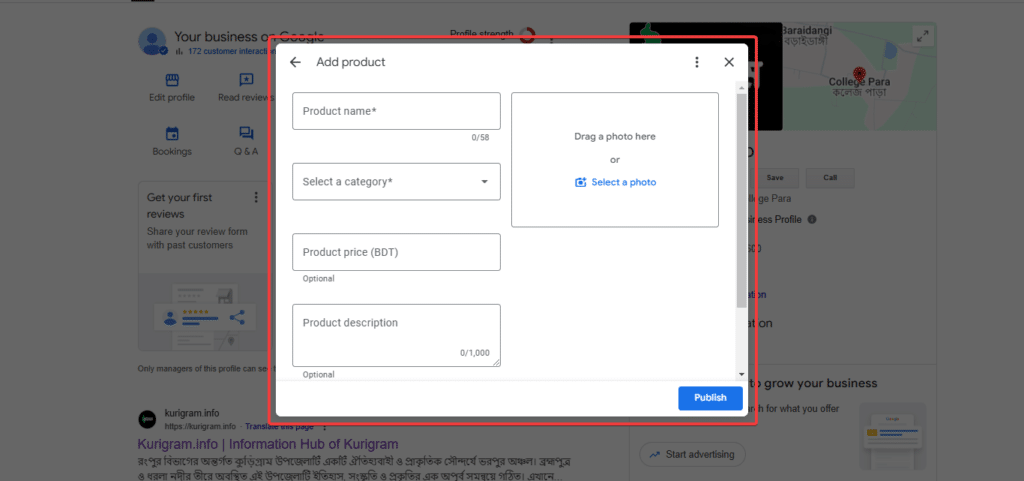
Retail businesses may be able to display products, prices, and availability through supported Google Business Profile features.
These options vary by business type and location.
A physical store might benefit from showing products customers can buy, while a service-area business may find its Services section more relevant.
Don't spend time trying to activate features that aren't available or appropriate for your business.
5. Use Photos That Show What Customers Can Expect
Photos help people understand your business before contacting or visiting you.
A restaurant can show its dining area and food. A repair workshop can show its equipment and workspace. A cleaning company can share genuine photographs of its team and completed work, with permission where needed.
The best images answer questions customers might have.
For a storefront, exterior photos help people recognize the entrance.
For a service business, photographs of your work, equipment, or staff may be more informative.
What Photos Should You Upload?
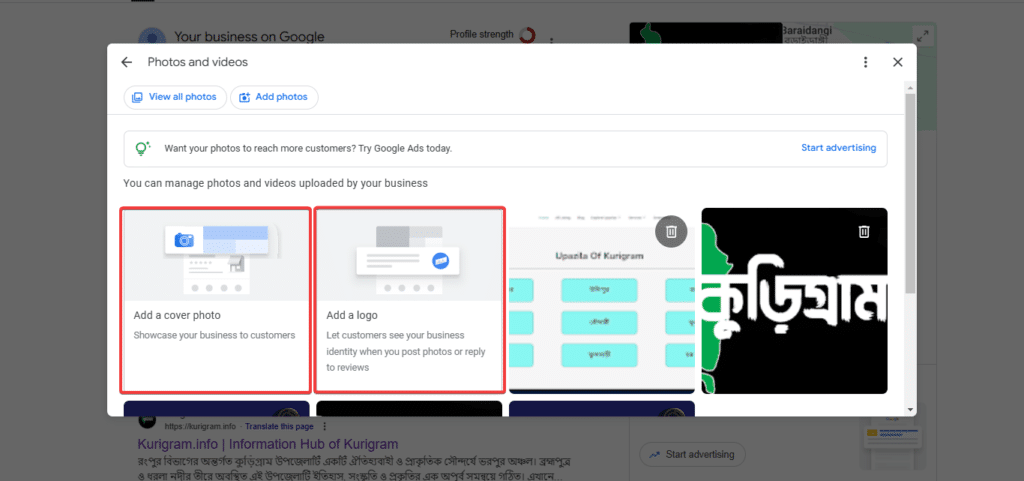
Start with a recognizable logo and a suitable cover photo.
Then add images relevant to your business.
You don't need three interior photos, three exterior photos, and three team photos simply to satisfy an arbitrary checklist.
A business without a public storefront doesn't need to manufacture storefront photographs.
Use the types of images that make sense for your operation.
Google's current photo guidelines recommend images with a resolution of 720 × 720 pixels, although the minimum supported resolution is lower.
Photos should be clear, properly lit, and represent the real business without excessive editing.
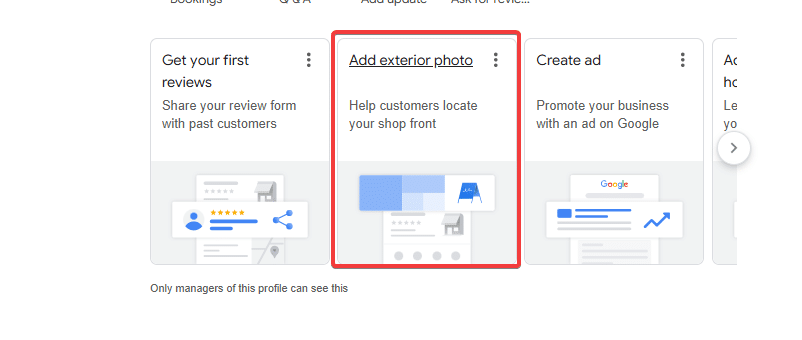
Update Photos When Something Changes
You don't need to upload new photographs every week.
However, it's worth refreshing them when your business changes.
For example, add new photos after renovating your premises, introducing an important service, or changing your storefront signage.
Keep older images only when they still represent what customers can expect.
A good collection of genuine photographs is more useful than a large gallery of repetitive or heavily edited images.
6. Make It Easy for Customers to Contact You
Your profile should give customers a straightforward way to take the next step.
Start with a working phone number and a website link that leads to the right page.
If you have a Wix website, check that the link opens correctly and that visitors can easily find your services and contact information.
For a service business, a dedicated service or booking page may be more helpful than sending every visitor to a general homepage.
However, use the primary website field and any additional action links according to Google's supported settings and policies.
Add Booking or Ordering Links Where Available
Some business categories support additional links for appointments, reservations, menus, or online orders.
If your profile offers these options, use URLs that lead to the appropriate page.
For example, a customer clicking a booking link should reach a page where they can actually arrange an appointment.
Google's business link policies require supported action links to lead to appropriate destinations.
Avoid linking to unrelated pages or making customers search through your website to complete the action.
What Happened to Google Business Profile Messaging?
Google discontinued its original Business Profile chat feature on July 31, 2024.
The associated call-history feature also ended.
However, some verified businesses can now add SMS or WhatsApp contact options to their profiles.
Availability depends on the business and region.
If your profile supports these options, you can review them under Edit profile → Contact.
Follow Google's current messaging instructions rather than older guides that recommend enabling the discontinued chat feature.
7. Encourage Genuine Customer Reviews
Customer reviews help people understand what previous customers experienced.
They can also contribute to your business's prominence in local search.
But reviews shouldn't be treated simply as a way to increase your star rating.
In BrightLocal's 2026 Local Consumer Review Survey, 54% of surveyed consumers visited a business's website after reading positive reviews.
That finding is useful because it shows how reviews and website information can work together.
A customer might read reviews first, then visit your website to learn more about your services before booking.
Ask for Reviews Without Offering Rewards
You can request an honest review after completing a service or purchase.
For example:
"Thank you for choosing our business. If you'd like to share your experience, we'd appreciate an honest Google review. Your feedback helps other customers learn about our services."
Google allows businesses to share review links and QR codes.
You can generate these through your Business Profile's review management options.
However, you must not offer discounts, gifts, or free services in exchange for reviews.
Google also prohibits selectively requesting positive reviews or discouraging negative feedback.
The goal is to gather genuine customer experiences, not manipulate the rating.
You can review Google's policy on prohibited review content before setting up your process.
8. Respond to Reviews Professionally
Customers may also consider how you respond to feedback.
A helpful reply can demonstrate that you're paying attention.
For a positive review, acknowledge the customer's experience without making the response unnecessarily long.
For example:
"Thanks for sharing your feedback. We're glad we could help with your appliance repair."
For a negative review, remain calm and avoid arguing publicly.
You might respond:
"We're sorry the appointment didn't meet your expectations. We'd appreciate the opportunity to review what happened. Please contact our team directly so we can discuss your concerns."
Don't reveal private customer information in a public response.
And don't pressure customers to change or remove negative reviews.
If several reviews mention the same issue, consider whether there's something your business needs to improve.
Sometimes the most valuable part of review management is identifying a recurring customer problem.
9. Publish Google Business Profile Updates When They're Useful
Google Business Profile allows eligible businesses to publish updates, offers, and events.
These posts can help customers learn about changes to your business without having to visit another platform.
For example, a repair company might share an update when it begins offering a new service.
A restaurant could announce a seasonal menu, while a local shop might publish details about an upcoming event.
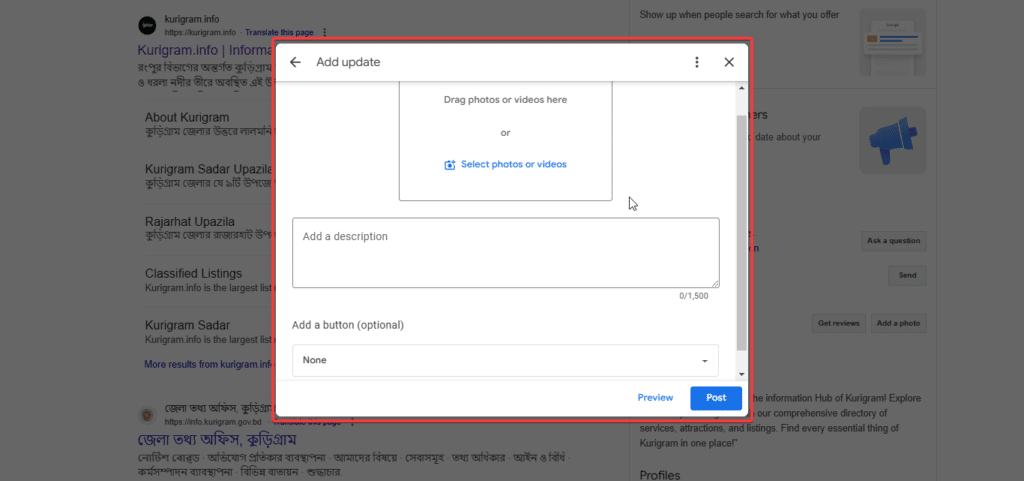
What Should You Post?
Choose updates that give customers useful information.
You might announce a new service, changed hours, a genuine promotion, or an event.
For example:
"We've expanded our appliance repair appointments to cover additional areas around Bristol. Visit our website to check our current service coverage and request an appointment."
Keep the message clear and make sure the information is accurate.
Do You Need to Post Every Week?
Not necessarily.
Google doesn't publish a rule stating that every business must post weekly to improve its local rankings.
If you have something relevant to share every week, a regular schedule may make sense.
If your business rarely changes, publish updates when there's useful news.
According to Google's Business Profile post documentation, posts can include updates, offers, and events. Google also supports scheduling and recurring posts through its current interface.
Posts older than six months are generally archived unless a date range is set.
Use the feature to communicate with customers rather than treating posting frequency as a ranking shortcut.
10. Understand the Changes to Google Business Profile Q&A
Older Google Business Profile guides often recommend creating questions and answering them directly in the profile's Q&A section.
That advice needs updating.
In November 2025, Google discontinued the Business Profile Q&A API.
Google also began changing how customers ask questions about businesses on Google Maps.
Instead of relying entirely on the traditional list of questions and answers, Google has been introducing AI-assisted experiences that help customers find relevant information.
In a December 2025 announcement, Google explained that customers could receive answers based on available business information and relevant reviews.
Some existing questions and answers may still be accessible, depending on the profile and interface.
What Should Businesses Do Instead?
Make sure customers can find answers to common questions through your website and the supported fields in your Business Profile.
For example, if customers regularly ask whether your cleaning company provides its own supplies, explain that on your service page.
If people need to know whether your business has wheelchair-accessible entrances, keep the relevant accessibility information accurate.
Don't create unnecessary keyword-heavy questions simply to influence search results.
The practical goal is to provide reliable information wherever customers may look for it.
What About AI Search?
Google Maps and other AI-assisted search experiences are changing how business information is presented.
However, you can't guarantee that an AI system will mention your business or reproduce every detail correctly.
Keep your services, website information, opening hours, and reviews accurate.
When you notice outdated or incorrect information on a platform you manage, correct it.
That remains a useful approach regardless of how customers discover your business.
11. Check Your Profile for Unintended Changes
Even when you aren't actively editing your profile, Google may receive updated information from other sources.
For example, users can suggest changes to business hours, addresses, and other details.
Google may also update information based on data available elsewhere.
Not every change will be correct.
That's why regular checks matter.
Open your Business Profile and review any suggested or applied changes.
Pay particular attention to your business name, primary category, address, opening hours, and contact details.
If Google has made an incorrect change, use the available editing options to submit the correct information.
You can learn more from Google's guide to Business Profile updates.
Keep Duplicate Listings Under Control
Another issue worth checking is duplicate business profiles.
A duplicate can arise when a former owner, employee, or agency creates a listing without realizing one already exists.
Don't create another profile to replace one you can't access.
Investigate the existing listing and use Google's ownership or duplicate-resolution process.
If a business operates several genuine locations, each location may qualify for its own profile, subject to Google's guidelines.
The important thing is to represent the actual business accurately.
12. Track What Your Google Business Profile Is Delivering
Once your profile is accurate and active, measure how people interact with it.
Google provides a Performance section for verified Business Profiles.
You can access it through your profile management interface.
Depending on the business, available metrics may include profile views, search terms, website clicks, call-button clicks, direction requests, and supported booking interactions.
These figures can help you understand how customers find and interact with your listing.
However, they need context.
A call-button click isn't necessarily a completed call. A direction request doesn't confirm a store visit, and a website click doesn't automatically become a lead.
Connect Profile Activity With Website Results
If your Wix website receives traffic from Google Business Profile, you can use appropriate UTM parameters on the website link to help distinguish those visits in your analytics.
For example, a tagged URL could include:
?utm_source=google&utm_medium=organic&utm_campaign=gbp
Make sure the complete URL works properly and doesn't interfere with your website's routing.
Then use Google Analytics or your other reporting tools to review what visitors do after clicking.
For a service business, successful inquiries and confirmed bookings may be more meaningful than profile views alone.
Google's Business Profile Performance documentation explains which interactions are measured and how the metrics are calculated.
Don't Measure Only Rankings
Local search results change depending on the searcher's location and query.
A business might appear prominently in one neighborhood and much lower in another.
This doesn't necessarily mean something is wrong.
Review your visibility across the areas you genuinely serve, but focus on whether your business is receiving relevant customer activity.
If you want to improve your broader local search presence, our local SEO best practices guide covers website content, citations, and other factors beyond your Google Business Profile.
A Practical Google Business Profile Optimization Example
Let's look at a fictional service-area business called Harbor Appliance Repair.
The business has a verified Google Business Profile, but several details are incomplete.
Its description is vague, the service list doesn't explain the types of repairs available, and the website link leads to a general homepage.
There are also a few old photographs that no longer represent the equipment the business uses.
The owner begins by checking the primary business category and service areas.
Next, they rewrite the description to explain the repairs the company provides. They update the service list, replace outdated photos, and review the website link.
They also introduce a neutral review-request process for customers after completed appointments.
Finally, they check Google Business Profile Performance and website inquiries over time.
These changes don't guarantee more calls or higher rankings.
But they make it easier for potential customers to understand the business, confirm its services, and take the next step.
That's the practical purpose of optimization.
How Often Should You Update Your Google Business Profile?
You don't need to change your profile every day.
A simple maintenance routine is usually enough for many small businesses.
When | What to review |
Weekly or when practical | New reviews, customer questions, and important profile notifications |
Monthly | Business information, services, photos, and Performance reports |
Whenever something changes | Opening hours, phone numbers, addresses, service areas, or booking links |
Every few months | Overall accuracy, competitor context, and opportunities to improve customer information |
These are suggested review intervals, not Google's ranking requirements.
A busy restaurant may need more frequent updates than a small service business with stable operating hours.
Adjust your routine to how often your business changes.
Frequently Asked Questions
Does Google Business Profile Optimization Improve Local SEO?
It can help Google understand your business and make your listing more useful to customers.
Google considers relevance, distance, and prominence when determining local results.
However, completing every field doesn't guarantee better rankings.
How Many Photos Should I Add to My Google Business Profile?
There's no universal number that every business must upload.
Start with genuine, relevant photos that help customers understand your location, products, services, or team.
Add new images when they provide useful information.
Is Posting on Google Business Profile a Ranking Factor?
Google hasn't confirmed a specific posting frequency as a direct local ranking factor.
Posts can still be useful for communicating business updates, events, and offers.
Can I Offer Discounts for Google Reviews?
No.
Google prohibits incentives such as discounts, payments, gifts, or free services in exchange for posting, changing, or removing reviews.
Ask customers for honest feedback without offering rewards.
Can I Still Use Google Business Profile Messaging?
Google's original built-in chat feature was discontinued in July 2024.
Eligible verified profiles in supported regions may offer SMS or WhatsApp contact options.
Check your profile's current contact settings to see what's available.
Can Wix Users Manage Google Business Profile?
Yes. Wix provides Google Business Profile integration for eligible websites with connected domains.
You can create a new profile or import an existing verified one and manage supported information through Wix.
Some features and account issues still require using Google's own interface.
Conclusion
Google Business Profile optimization is mostly about keeping your business information accurate, showing what you offer, and making it easy for customers to contact you.
Start with your categories, services, photos, and reviews, then check the profile regularly as your business changes.
If you need help reviewing or maintaining your listing, explore WixSolution's GBP Maintenance service.


