
Wix SEO Guide 2027: A Practical Step-by-Step Tutorial
Updated: Nov 9
Building a website on Wix is relatively straightforward. Getting the right people to find it through Google takes more work.
The good news is that Wix already includes many useful SEO tools. You can manage page titles, indexing settings, structured data, redirects, and search performance without changing platforms.
This guide explains how to use those tools, improve your website content, and track what actually brings visitors and customers. We'll also cover AI search and the SEO mistakes worth avoiding.
Can Wix Websites Rank on Google?
Yes. Wix websites can be crawled, indexed, and ranked by Google, just like websites built on other platforms.
Wix provides built-in SEO settings, automatic XML sitemaps, mobile-friendly design tools, and integration with Google Search Console.
But using Wix doesn't guarantee good rankings.
Your results depend on several factors, including your content, competition, website accessibility, and how well your pages match what people are searching for.

A useful way to understand SEO is to separate it into three stages.
Crawling: Google discovers your website pages, usually by following links or using information from your sitemap.
Indexing: Google processes a page and decides whether to include it in its search index.
Ranking: When someone searches, Google selects and orders results it considers relevant to that query.
A page needs to be accessible and eligible for indexing before it can compete in search results. But being indexed doesn't mean it will rank for every keyword you want.
Before worrying about advanced optimization, make sure Google can discover and understand your most important pages.
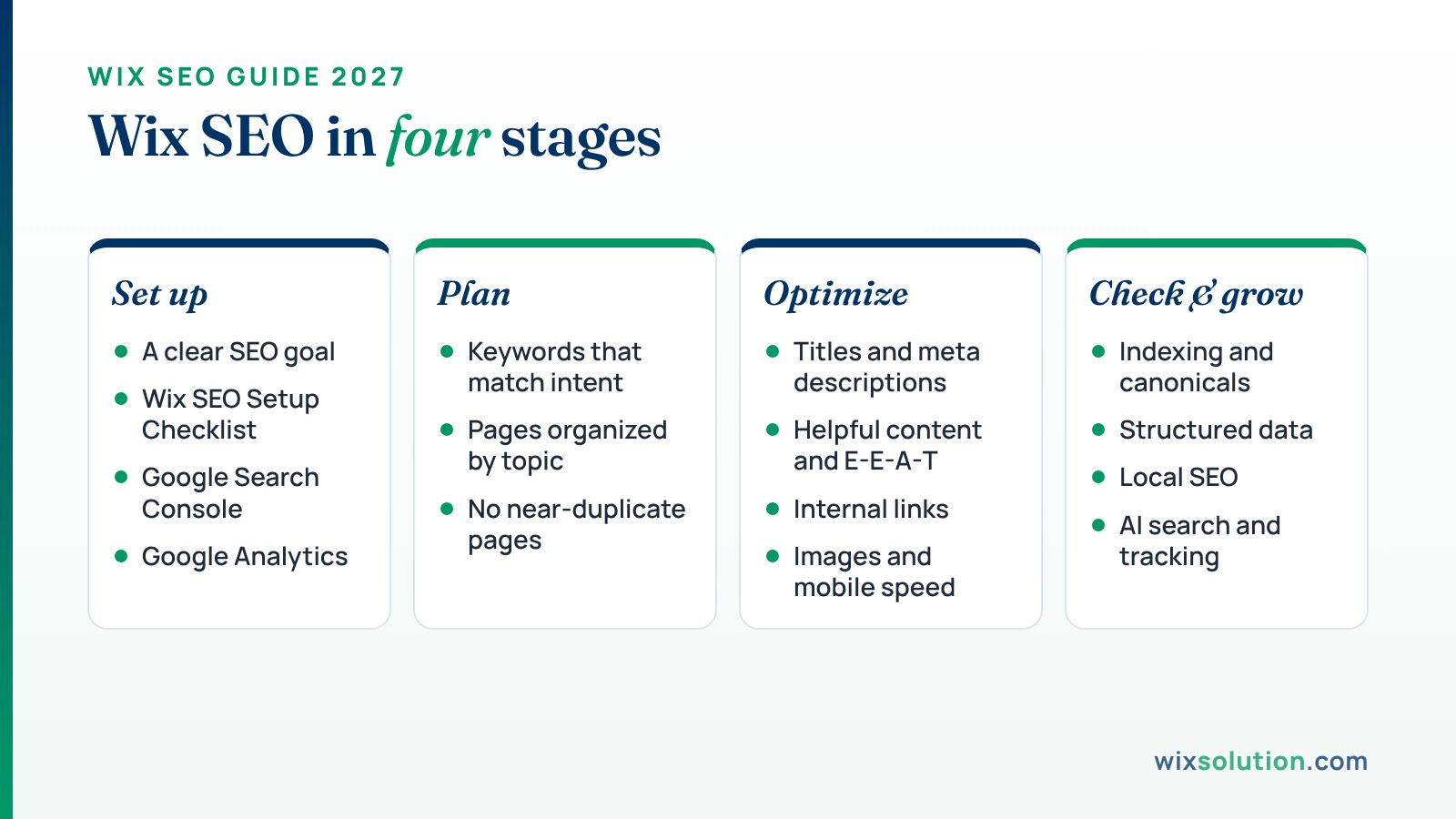
1. Start With a Clear SEO Goal
Before changing your website, think about what you want SEO to achieve.
More traffic can be useful, but traffic alone doesn't pay the bills.
For a service business, the goal might be more qualified inquiries. An online store may want additional product sales. A consultant might want people to book introductory calls.

Your SEO priorities should reflect those goals.
For example, suppose you operate a mobile bicycle repair business in Bristol.
Getting 1,000 visitors to a general cycling article may be less valuable than receiving 50 visits from people actively looking for mobile bicycle repair appointments in your service area.
Both types of traffic can be useful, but they serve different purposes.
Start by identifying your most important services or products, the customers you want to reach, and the actions you'd like visitors to take.
You can then use those priorities to decide which pages need attention first.
2. Set Up the Wix SEO Setup Checklist
Wix provides an SEO Setup Checklist to help you configure some of the fundamentals.
It's a useful starting point, particularly for a new website.
How to Access the Wix SEO Setup Checklist
Sign in to your Wix dashboard.
Open SEO & GEO.
Scroll to Tools and settings.
Select SEO Setup Checklist.
Click Get Started.
Wix will ask for basic information about your business, where you serve customers, and keywords related to your website.
Choose phrases that accurately describe your business.
For example, a home cleaning company could start with "house cleaning Bristol," "domestic cleaning services," and "end of tenancy cleaning."
These phrases give Wix context for its recommendations. They aren't a list of keywords Google will automatically rank your website for.
After completing the setup, review the recommended tasks.
Wix may suggest changes to your homepage title, description, content, and other important details.
Don't Rely Only on the Checklist
The SEO Setup Checklist has limitations.
According to Wix's documentation, it doesn't fully analyze content from apps such as Wix Blog and Wix Stores.
This means completing the checklist doesn't necessarily mean all your blog posts, product descriptions, or service pages are optimized.
You'll still need to review those pages individually.
You can also use the Wix SEO Assistant to identify additional optimization tasks. Some assistant features require an upgraded site.
3. Connect Google Search Console to Your Wix Website
Google Search Console is one of the most useful free tools for website owners.
It helps you understand how your website performs in Google Search and whether Google has problems accessing your pages.
You can see which search queries generate impressions and clicks, which pages are indexed, and whether Google has reported certain technical issues.
How to Connect Wix to Google Search Console
Wix provides a direct connection through its SEO Setup Checklist.
Open your checklist and follow the steps for connecting your website to Google.
For this integrated connection, Wix currently requires a Premium plan and a connected domain.
If you've already verified your website manually in Search Console, you generally don't need to repeat the process through Wix.
You can also visit Google Search Console directly and use a supported verification method.
Once connected, give Google time to collect information.
New websites may have limited data initially.
What Should You Check First?
Start with the indexing reports.
If your homepage or an important service page isn't indexed, investigate the reason before spending time adjusting keywords.
Google's URL Inspection tool can help you see whether a page has been indexed and which URL Google considers canonical.
After that, review the Performance report.
Look at the searches people use to find your pages and identify opportunities to make your content more relevant.
You don't need to check Search Console every day. A regular review is usually more helpful than reacting to small daily changes.
4. Connect Google Analytics for Better Website Insights
Search Console tells you what happens in Google Search.
Google Analytics helps you understand what happens after visitors arrive on your website.
For example, you can investigate whether people read a service page, explore other content, or complete a contact form.
How to Connect Google Analytics to Wix
First, create a property in Google Analytics.
You'll receive a measurement ID for your website.
Then open Marketing Integrations in your Wix dashboard, find Google Tag, and follow the connection steps.
Wix's current process allows you to add your Google Analytics measurement ID through the Google Tag integration.
For detailed instructions, see Wix's Google Analytics connection guide.
Once connected, test that data is being collected.
If your website uses contact forms, bookings, or checkout features, identify which actions matter most and make sure you're measuring them appropriately.
It's also worth checking the privacy and consent requirements that apply to your business and customers.
5. Find Keywords That Match Your Business
Keyword research helps you understand how potential customers describe their needs.
You don't need to find hundreds of keywords before starting.
Begin with your main services, products, and customer questions.
Let's return to the fictional mobile bicycle repair business.
A person searching for "mobile bike repair Bristol" probably wants to find someone who can repair their bicycle.
Someone searching for "how to fix squeaky bicycle brakes" is looking for instructions.
Both searches are relevant to the business, but they shouldn't necessarily lead to the same page.
Match Keywords With Search Intent
Search intent is the reason someone enters a query.
Here are a few examples:
Search query | Likely intent | Suitable page |
Mobile bike repair Bristol | Find a local service | Main service page |
Bicycle puncture repair cost | Understand pricing | Pricing or service guide |
How to adjust bicycle brakes | Learn a process | Blog tutorial |
Book mobile bike mechanic | Arrange an appointment | Booking or service page |
This distinction helps you avoid creating pages that try to answer too many unrelated questions.
Where to Research Keywords
Start with Google Search, Google Search Console, and Google Keyword Planner.

Wix also integrates with keyword research providers, including Semrush.
You can access available keyword research options through the Wix SEO Setup Checklist or SEO Assistant.
These tools can provide estimates for search volume, competition, and search intent.
Remember that keyword metrics are estimates, not guaranteed traffic predictions.
A phrase with lower search volume may still be worth targeting if it closely matches a service you offer.
Practical tip: Use customer questions as a research source. The wording people use in emails, calls, and contact forms can reveal useful topics that keyword tools don't always highlight.
6. Organize Your Wix Website Around Important Topics
A clear website structure helps visitors find relevant information and makes it easier for search engines to discover your pages.
For a service business, the structure might look like this:
Page | Example URL | Purpose |
Homepage | / | Introduce the business |
Services | /services | Show available services |
Mobile Bike Repair | /mobile-bike-repair | Explain the main service |
Bike Maintenance | /bike-maintenance | Explain another service |
Service Areas | /service-areas | Show coverage |
About | /about | Introduce the business |
Contact | /contact | Help customers make inquiries |
Blog | /blog | Answer related questions |
These are example URLs, not mandatory Wix URL structures.
Wix supports parent-child relationships for eligible main pages, allowing you to organize more complex websites where appropriate.
However, you don't need to create complicated URL folders simply to improve SEO.
Focus on making important pages easy to reach.
Avoid Creating Too Many Similar Pages
Suppose you offer three closely related services.
You might be tempted to create ten pages targeting slightly different versions of the same keyword.
But if those pages contain almost identical information, they may not help visitors.
Instead, decide whether each page serves a genuinely different need.
A dedicated page for mobile bicycle repair makes sense if it explains how the service works, where it's available, and how to book.
A second page repeating the same information with a slightly different keyword probably adds little value.
For a detailed example of how to organize service pages, read our website structure guide for service businesses.
7. Optimize Your Wix Page Titles and Meta Descriptions
Your SEO title helps search engines and potential visitors understand what a page offers.

It should describe the page accurately.
For example:
Weak SEO title: Our Professional Services
Better SEO title: Mobile Bicycle Repair in Bristol | Business Name
The second example explains the service and location.
For a blog post, you might write:
How Much Does Bicycle Repair Cost? A Practical Guide
A useful title doesn't need exaggerated claims or unnecessary keywords.
Google may also generate or adjust the title shown in search results, so your chosen title isn't guaranteed to appear exactly as written.
Write Helpful Meta Descriptions
A meta description gives visitors a short summary of the page.
For example:
Need mobile bicycle repairs in Bristol? Learn about our puncture repairs, brake adjustments, and bicycle servicing, and find out how to book.
This tells visitors what to expect.
There's no universal character limit that guarantees Google will display the whole description.
Google may also use text from the page instead of your selected meta description.
Focus on writing something accurate and useful rather than hitting an exact character count.
How to Edit SEO Titles in Wix
Open your Wix dashboard and go to SEO & GEO → SEO Settings.
Select the relevant page type, such as Main Pages, Blog posts, or Products.
You can customize default SEO settings for a page type or use the individual page editing option to update a particular page.
For individual pages, review the title tag, meta description, URL slug, and indexing setting.
If you're updating a published page, remember to publish the changes.
For a more detailed explanation, see our on-page SEO guide for Wix websites.
8. Write Content That Helps People Make Decisions
A page can include all the right keywords and still be unhelpful.
Imagine someone visiting a bicycle repair service page.
They're probably interested in what you repair, where you work, how appointments are arranged, and what the service might cost.
A paragraph saying "We provide high-quality solutions with customer satisfaction" doesn't answer those questions.
Instead, explain your work clearly.
For example:
"We provide mobile bicycle repairs at customers' homes and workplaces in Bristol. Common repairs include punctures, brake adjustments, gear tuning, and routine servicing. You can contact us with a description of the problem to discuss availability and the next steps."
This example is fictional, but it shows the difference between general marketing language and useful information.
Add Information Based on Real Experience
Google's people-first content guidance encourages original information, clear sourcing, and content that demonstrates relevant knowledge or experience.
For a service company, that could mean explaining how your process works, answering questions customers regularly ask, or sharing genuine examples of completed projects.
For a tutorial, it could mean showing the exact Wix settings involved and explaining the mistakes readers should avoid.
You don't need to make every article unusually long.
Write enough to answer the question properly.
If you have genuine screenshots, observations, or project examples, use them where they improve the explanation.

9. Understand E-E-A-T and Build Trust
E-E-A-T stands for Experience, Expertise, Authoritativeness, and Trustworthiness.
Google uses this concept in its guidance for evaluating content quality.
It isn't a single score you can improve by adding a badge or repeating the phrase "SEO expert."
Trust is the most important part.
For a Wix SEO article, that means providing accurate instructions, linking to reliable sources, and being clear about who wrote or reviewed the content.
What Does E-E-A-T Look Like in Practice?
Suppose you're writing an article about improving Wix website indexing.
A generic article might say:
"Fix technical issues to improve rankings."
A more useful article would explain how to use Wix Site Inspection, what a particular indexing status means, and how to investigate the problem in Google Search Console.
If you've encountered that issue during a real project, you can add a screenshot or describe the problem and the steps taken to resolve it.
This makes the advice easier to understand and verify.
An Example From WixSolution's Published Work
One relevant example is WixSolution's StudioTech SEO case study.
StudioTech is a Wix-based event connectivity business serving customers in Los Angeles.
According to the published case study, the work included creating dedicated rental-service pages, improving location-specific titles, adding relevant structured data, and publishing content for event organizers.
The study reports that Google Search Console clicks increased from 38 to 229 when comparing June 1–September 29, 2025, with the same period in 2026.
Those results reflect the combined work documented in that project. They shouldn't be interpreted as proof that changing page titles alone caused the increase or that another website would experience similar results.
The useful lesson is the process: identify which services people search for, give those services suitable pages, and measure how visibility changes over time.
10. Add Helpful Internal Links
Internal links connect pages within your website.
They help visitors explore related topics and allow search engines to discover pages through your site's navigation and content.
For example, an article about repairing bicycle brakes could link to the business's bicycle repair service page.
A page explaining mobile repair appointments might link to the service areas page.
The links should make sense to the person reading.
Use descriptive anchor text rather than repeatedly writing "click here."
You can also link from older articles to newer relevant pages.
For example, if you've recently published a detailed service guide, look for existing articles where that guide would provide useful additional information.
Don't add links to every paragraph simply because an SEO checklist recommends internal linking.
A few well-placed links are often more helpful than dozens of unrelated ones.
11. Optimize Images and Mobile Performance
Images can help visitors understand your business, but they shouldn't make the website difficult to use.
Start by reviewing the images on your most important pages.
Are they relevant? Do they display correctly on mobile? Are they unnecessarily large?
Wix provides image optimization features, but it's still worth uploading appropriately sized assets.
For example, a small service-page image doesn't usually need to be uploaded at an enormous resolution.
Use Descriptive Alt Text
Alternative text describes images for people using assistive technologies and helps search engines understand image content.
For example:
Unhelpful alt text: Best bike repair Bristol bike SEO
Better alt text: Bicycle mechanic adjusting the rear brake during a repair
The second example describes the actual image.
Avoid filling alt text with keywords.
If an image is purely decorative and doesn't convey meaningful information, an empty alt attribute may be appropriate.
Check Core Web Vitals
Google's Core Web Vitals measure important aspects of page experience.
Metric | What it measures | Good threshold |
LCP | Main content loading time | 2.5 seconds or less |
INP | Responsiveness to interactions | 200 milliseconds or less |
CLS | Unexpected layout movement | 0.1 or less |
These are Google's recommended thresholds for good user experience.
You can check your website using PageSpeed Insights.
For Wix websites, pay particular attention to oversized media, unnecessary third-party apps, intrusive pop-ups, and complex mobile layouts.
Don't remove useful functionality simply to achieve a perfect performance score.
The aim is a website that feels comfortable and reliable to use.
12. Review Your Wix Website's Indexing and Technical SEO
Wix handles several technical SEO tasks automatically, but it's still important to understand what your settings do.
Check Whether Your Pages Can Be Indexed
Open SEO & GEO → SEO Settings in Wix.
Make sure search engine indexing is enabled for the website and for the individual pages you want to appear in search results.
If an important page isn't appearing on Google, use Google Search Console's URL Inspection tool or Wix Site Inspection to investigate.
A page may be excluded because it's marked noindex, redirects elsewhere, duplicates another page, or hasn't been selected for indexing.
Not every excluded page represents a problem.
For example, certain utility pages or duplicate URLs may not need to appear in search results.
Wix Automatically Creates an XML Sitemap
You generally don't need to create a sitemap manually.
Wix creates and updates your site's XML sitemap automatically.
You can view it by visiting:
Your sitemap helps search engines discover important URLs.
According to Wix's sitemap documentation, completing its SEO Setup Checklist can also submit your sitemap index to Google.
Submitting a sitemap doesn't guarantee that every page will be indexed.
Be Careful When Changing URLs

Suppose you've published a service page at:
Later, you decide to change it to:
If you change an established URL, make sure visitors and search engines are redirected appropriately.
Wix can automatically create 301 redirects for supported page types when their URL slugs change.
However, Wix Blog posts are an important exception. When you change a blog post URL, you need to create the redirect manually using the URL Redirect Manager.
You can access that tool through SEO & GEO → Tools and settings → URL Redirect Manager.
Also review important internal links after making URL changes.
Check Canonical URLs
Canonical tags help search engines understand which URL is intended to represent a page when similar or duplicate versions exist.
Wix automatically generates default canonical tags for supported pages, including blog posts.
You generally don't need to change them unless there's a specific reason.
Incorrect canonical settings can cause search engines to treat the wrong URL as the preferred version.
If you're unsure, investigate the issue in Search Console before editing canonical tags.
13. Use Structured Data Where It Makes Sense
Structured data provides machine-readable information about a webpage.
Depending on the page type, it can describe an article, product, organization, business, or other supported information.
Wix already provides structured data for several page types.
For example, Wix Blog includes BlogPosting markup by default.
Wix can also generate Local Business markup for your homepage using relevant information from your site's Business Info settings.
Before adding custom structured data, review what Wix has already generated.
You can inspect supported markup using Google's Rich Results Test.
If you add custom markup, make sure it accurately describes information that is visible or supported on the page.
Structured data doesn't guarantee higher rankings, rich results, or inclusion in AI-generated answers.
It can help search engines interpret relevant information, but it isn't a replacement for useful content.
14. Improve Local SEO If You Serve Customers in a Specific Area
If your business serves customers in a particular city or region, local SEO deserves attention.
Start by making your services and location clear on your website.
For example, a cleaning company should explain which areas it serves and how customers can arrange appointments.
If your business qualifies for Google Business Profile, keep its details accurate.
Your profile can help customers find your phone number, website, reviews, operating hours, and location or service area on Google Search and Maps.
You can follow our Google Business Profile setup guide for Wix to learn how to create or connect a listing.
Local SEO also involves maintaining genuine customer reviews, relevant business listings, and useful location-specific content.
You don't need to create a separate page for every nearby town.
Instead, create location pages when they offer meaningful information for customers in those areas.
For more detail, read our local SEO best practices guide.
15. Prepare Your Wix Website for AI Search
Search engines are changing how they present information.
Google AI Overviews and AI Mode can provide AI-generated responses, while other platforms may summarize information from websites or recommend relevant sources.
This doesn't mean traditional SEO has stopped working.
Google's AI search documentation explains that established SEO practices remain relevant for its AI search features.
There isn't a special type of schema or an AI-specific file that guarantees inclusion.
What Should You Do Differently?
Focus on making your important information easy to understand.
For a service business, that means clearly explaining what you offer, where you work, how customers can contact you, and what they should know before booking.
For educational articles, answer the main question directly and support important recommendations with reliable information.
Original examples, clear descriptions, and genuine experience can make your content more useful.
AI search doesn't require you to repeat keywords more often or format every paragraph as a question.
What Does Recent Research Show?
A July 2025 Pew Research Center study found that users clicked traditional search results in 8% of observed Google visits where an AI summary appeared, compared with 15% of visits without an AI summary.
These findings reflect the study's sample and observation period, not a universal prediction for 2027.
They do suggest that some search questions may be answered without a website visit.
For business owners, that makes it worth measuring real inquiries and customer actions rather than focusing only on search traffic.
Use Wix's AI Visibility Tools Carefully
Wix now offers an AI Visibility Overview for eligible Premium sites.
It provides information about how selected AI platforms mention or cite your website, along with other visibility and referral data.
You can explore it through the SEO & GEO dashboard.
However, its visibility score is based on a set of tested questions. It isn't a universal measure of how often your website appears in every AI conversation.
AI-generated answers can also vary between tests.
Use these reports to identify questions and possible content gaps, not as a guarantee that a particular change will improve AI recommendations.
You can learn more from Wix's AI Visibility Overview documentation.
16. Track Results and Decide What to Improve Next
SEO isn't finished when you publish a page.
After making improvements, review whether they're helping you reach the right audience.
Google Search Console can show changes in impressions, clicks, and the queries associated with your pages.
Google Analytics can help you understand what visitors do once they arrive.
For example, a service page might receive more organic traffic after you improve its title and content.
That's useful, but it's also worth checking whether visitors are completing the contact form or booking appointments.
If clicks increase but inquiries remain unchanged, review the page's message, the relevance of its traffic, and the contact process.
What Should You Prioritize?
Not every page needs attention at the same time.
A reasonable order is:
Fix problems preventing important pages from being indexed.
Improve pages that directly support your main services or products.
Update content that receives impressions but doesn't adequately answer the searcher's question.
Add relevant internal links and resolve important usability issues.
Publish new content when you've identified a genuine customer need.
For a more detailed review, see our Wix website SEO audit guide.
You can revisit your SEO priorities monthly or whenever meaningful changes occur in your business, search performance, or website content.

Common Wix SEO Mistakes to Avoid
A few mistakes are worth checking before you invest time in more advanced SEO work.
Ignoring indexing settings: A useful page can't compete in Google Search if it isn't eligible for indexing.
Using the same SEO title everywhere: Important pages should have titles that reflect their individual content.
Creating multiple nearly identical service pages: Give each page a useful purpose instead of changing only the keyword.
Changing blog URLs without redirects: Wix Blog requires manual redirects when post slugs change.
Publishing generic content without reviewing it: Check facts, answer real questions, and add original information where possible.
Expecting immediate rankings: Google needs time to process changes, and indexing or ranking improvements aren't guaranteed.
Most of these problems can be addressed without rebuilding the website.
Frequently Asked Questions
Is Wix Good for SEO in 2027?
Wix provides many of the tools needed for search optimization, including editable metadata, sitemaps, structured data, redirects, and Search Console integration.
Whether your website performs well depends on the content, competition, technical accessibility, and ongoing work—not simply the platform.
Can I Do SEO on a Free Wix Website?
Yes. Free Wix websites can be accessible to search engines, and you can work on content and supported SEO settings.
However, some integrations and features require a Premium plan or connected domain.
For a business website, a custom domain can also provide a clearer, more professional address for customers.
How Long Does Wix SEO Take to Work?
There's no fixed timeline.
Some technical fixes may help Google access your pages once they're recrawled. Improving visibility for competitive searches may take months or longer.
Track progress over time and focus on actions that support your business goals.
Do I Need an SEO Expert to Optimize Wix?
Not necessarily.
Many important tasks can be handled through Wix's dashboard, especially if you have a relatively small website.
Professional assistance may be useful when you're dealing with complicated indexing issues, website migrations, multiple locations, or larger content and technical SEO projects.
Does Wix Automatically Handle Everything for SEO?
No.
Wix handles several technical tasks and provides helpful defaults, but it can't determine everything your customers need to know.
You'll still need to research relevant topics, create useful content, review your business information, and measure results.
Can Wix Websites Appear in AI Search Results?
Yes, eligible content from Wix websites can be discovered and used by supported AI search experiences.
However, no website builder or optimization method guarantees that an AI system will mention or recommend a particular website.
Final Thoughts
Good Wix SEO starts with clear website goals, useful content, and making sure search engines can access your important pages.
You don't need to change everything at once. Start with your main pages, fix the issues that matter most, and use Search Console and analytics to guide further improvements.
If you need help reviewing your Wix website, WixSolution offers Wix SEO services covering technical issues, content optimization, and ongoing search performance.


