
19 Local SEO Best Practices for Small Businesses in 2027
When someone nearby searches for a product or service, you want your business to be easy to find. But showing up on Google Maps or local search results takes more than having a website.
Local SEO helps people discover your business, check your services, and decide whether to contact you.
Here are 19 practical local SEO best practices to help you improve your online presence in 2027.
What Is Local SEO?
Local SEO (Search Engine Optimization) is the process of improving your business's visibility in location-based searches.
For example, someone might search for "emergency plumber in Austin," "coffee shop near me," or "washing machine repair in Leeds."
Google may show a local map pack with nearby businesses, along with regular website results.
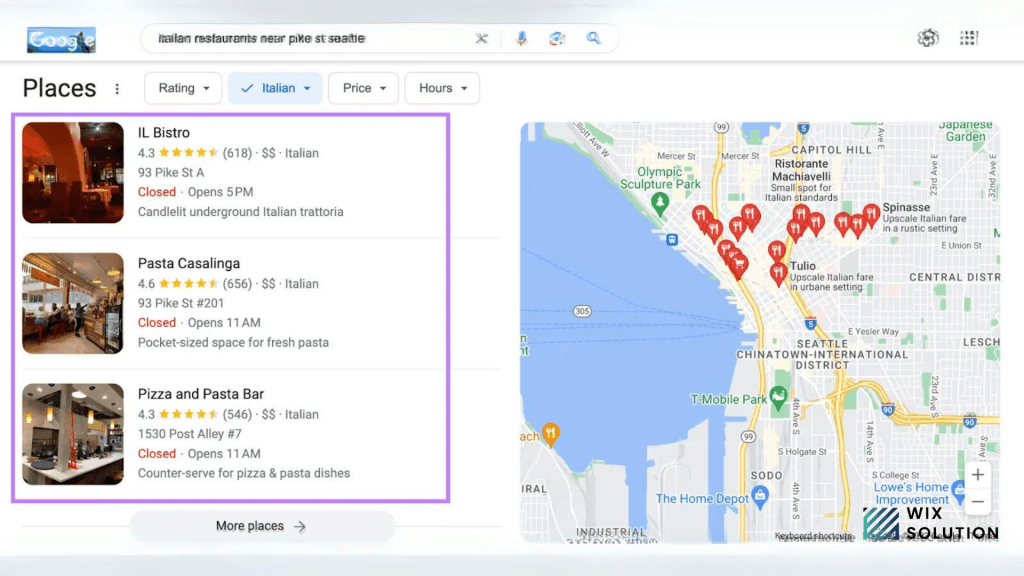
According to Google's local ranking guidelines, local results mainly depend on three factors:
Relevance: How closely your business matches what someone is searching for.
Distance: How far your business is from the searcher's location or the location mentioned in their search.
Prominence: How well-known or established your business appears to be.
You can't control every factor, especially distance. But you can improve your business information, website content, and online reputation.
What Recent Research Says About Local Search
In July 2026, BrightLocal surveyed 1,227 U.S. consumers about their most recent local business search.
The research found that:
73% started their local business search on a mobile phone.
75% used more than one channel while researching a business.
23% used AI tools at some point during their search.
These findings help explain why local SEO now involves more than Google Maps.
Customers may discover a business on Google, read reviews elsewhere, and visit its website before making a decision.
The following practices focus on making that process easier for your customers.

1. Find Keywords Your Local Customers Actually Use
Start by understanding how people search for your products or services.
A plumbing company might describe its services as "residential plumbing maintenance," while customers search for "leaking pipe repair near me" or "emergency plumber in Dallas."
Both phrases relate to plumbing, but they reveal different needs.
Think about the problems customers want solved, not just the names of your services.
For example, an appliance repair business might target:
Washing machine repair in Leeds
Dishwasher repair near me
Refrigerator repair cost
Emergency appliance repair
Why is my washing machine not draining?
Some of these searches belong on service pages. Others work better as helpful blog articles.
Where to Find Local Keywords
You can start with free tools:
Google Search: Explore autocomplete suggestions, related searches, and common questions.
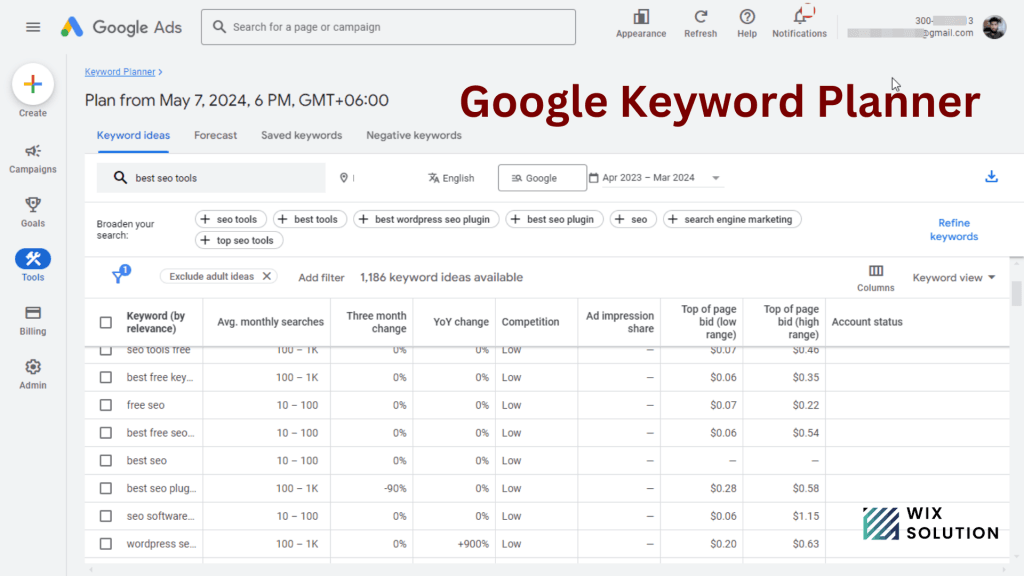
Google Keyword Planner: Research keyword ideas and geographic demand.
Google Search Console: Find searches that already bring impressions and clicks to your website.
Customer conversations are useful, too. If people repeatedly ask the same question before booking, it may be worth answering on your website.
Don't choose keywords based only on search volume. A specific service-related search with modest traffic can be more valuable than a broad keyword that attracts people outside your area.
2. Research Your Local Competitors
Before making changes, look at the businesses already appearing for your main local keywords.
Search for your service and location, then review both Google Maps listings and regular website results.
Pay attention to:
Their primary Google Business Profile categories
Services and locations they mention
Customer reviews and common feedback
Website content and page structure
Booking and contact options
You're looking for useful gaps, not content to copy.
For example, suppose several appliance repair companies mention dishwasher repairs but don't explain which brands they service or what happens during an appointment.
If you can provide those details accurately, your page may be more helpful to potential customers.
Also, remember that local rankings change by location. A business ranking well in one neighborhood may appear differently a few miles away.
3. Create and Verify Your Google Business Profile
A Google Business Profile (GBP) helps eligible businesses manage their appearance on Google Search and Maps.
Customers can use it to find your address or service area, phone number, business hours, website, photos, and reviews.
First, search for your business on Google Maps.
If a listing already exists, check whether you have access to manage it. If you don't, follow Google's ownership request process rather than creating a duplicate listing.
If your business isn't listed, you can create a profile at Google Business Profile.
Google may ask you to verify the business before granting full management access. The available verification methods depend on your business and may include video, phone, email, or postcard verification.
For Wix website owners: Wix also provides an option to create or connect a Google Business Profile from the dashboard.
You can follow our Google Business Profile setup guide for Wix for detailed instructions.
4. Choose the Right Business Categories
Your Google Business Profile category helps Google understand what your business does.
Choose the most accurate primary category available.
For example, if your main business is repairing appliances, select the category that best represents appliance repair rather than a general retail category.
You can add relevant secondary categories when they reflect genuine services.
The 2026 Local Search Ranking Factors report from Whitespark identifies the primary Google Business Profile category as an important factor in its survey of local SEO professionals.
Although expert surveys don't reveal Google's exact ranking algorithm, choosing the right category is a sensible part of setting up your profile.
You should also review your listed services.
A repair company might include dishwasher repair, washing machine repair, and oven repair, provided it actually offers those services.
Avoid adding unrelated categories or services simply to appear for more keywords.
5. Set Your Business Address and Service Areas Correctly
The location information in your Google Business Profile should reflect how your business operates.
Google distinguishes between three common business types.
Storefront businesses welcome customers at a physical location. A restaurant, retail store, or staffed repair workshop may qualify.
Service-area businesses travel to customers. Examples include mobile cleaners, electricians, and home appliance repair technicians.
Hybrid businesses serve customers at a physical location and also travel to customers.
If you operate a service-area business from home and customers don't visit you there, hide your residential address and add the areas you genuinely serve.
Google allows eligible businesses to specify up to 20 service areas. Its service-area guidelines also explain how to define a reasonable service region.
Adding more cities doesn't automatically improve your rankings throughout those areas.
Choose locations based on where you actually work.
6. Keep Your Business Information Consistent
Imagine a customer finds your business on Google Maps, but your website shows a different phone number.
Or Google says you're open on Sunday, while your website says you're closed.
Small inconsistencies can create real problems for customers.
Keep your business name, address where applicable, phone number, website, and operating hours accurate across the platforms you use.
This information is often called NAP (Name, Address, Phone Number).
You don't need identical punctuation on every website. What matters is that the information clearly refers to the same business.
Whenever your business changes its phone number, moves location, or updates its opening hours, review your important listings.
It's also worth checking old directories that may still display outdated information.
7. Add Genuine Photos to Your Google Business Profile
Photos help customers understand what your business looks like and what you provide.
A restaurant can show its dining area and food. A landscaping company can share completed projects. A repair business can show its workshop, equipment, and team.
Use clear, recent photos that represent your actual business.
For storefronts, include exterior photos that help customers recognize the entrance.
For service businesses, photos of your work and equipment can be useful.
You can also publish Google Business Profile updates when you have something relevant to share, such as a new service, changed opening hours, or an upcoming event.
There's no need to post every day just for SEO. Focus on keeping the information useful and current.
8. Encourage Honest Customer Reviews
Reviews help potential customers understand what working with your business is like.
They can also contribute to your business's prominence in local search.
According to BrightLocal's 2026 Local Consumer Review Survey, 74% of surveyed consumers looked for reviews written within the previous three months.
That makes recent feedback worth paying attention to.
One practical approach is to ask customers for a review after you've completed a service.
For example:
"Thanks for choosing us. If you have a moment, we'd appreciate an honest review of your experience. Your feedback helps other customers learn about our service."
You can include your Google review link in a follow-up email or message.
However, Google doesn't allow incentives such as discounts or gifts in exchange for reviews.
You also shouldn't ask only satisfied customers while filtering out people who may leave negative feedback.
Follow Google's review policies and focus on receiving genuine customer experiences.
9. Respond to Customer Reviews
Customers often look beyond star ratings to see how a business treats people.
Responding to reviews gives you an opportunity to thank customers, clarify concerns, and show that feedback matters.
For a positive review, a simple response can work well:
"Thanks for your feedback! We're glad we could help with your dishwasher repair."
For a negative review, remain professional and avoid sharing private information.
You could say:
"We're sorry to hear about your experience. We'd like to understand what happened and see how we can help. Please contact our team directly."
You don't need to write long responses to every review.
Be genuine, and pay attention when multiple customers raise the same issue. Sometimes the most valuable part of review management is what you learn about your service.
10. Build Relevant Local Citations
A local citation is a mention of your business on another website.
It might appear in an online directory, an industry association, a local chamber of commerce website, or a review platform.
Citations can help customers find your business and confirm important details.
Start with directories that are established and relevant to your location or industry.
You may also want to manage your information on:
Relevant local business directories
Industry-specific listing platforms
Check whether your business already has a listing before creating another.
Avoid submitting your details to hundreds of unrelated directories just to build links.
A smaller number of accurate, useful listings is a better starting point.
11. Create Dedicated Pages for Your Main Services
If your business offers several services, don't squeeze everything into one generic page.
Suppose you repair washing machines, refrigerators, dishwashers, and ovens.
You could create individual service pages such as:
Washing Machine Repair
Refrigerator Repair
Dishwasher Repair
Oven Repair
Each page should explain what the service includes, which problems you handle, and how customers can book.
For a washing machine repair page, you might cover common faults, the diagnostic process, brands you work with, and appointment availability.
The goal is to help someone decide whether your service meets their needs.
You don't need a separate page for every minor variation. Create pages when there's enough useful information to justify them.
12. Create Helpful Location Pages
Location pages can help businesses explain where they operate.
For example, a company with staffed offices in Manchester and Liverpool could create a page for each location, including the correct address, opening hours, phone number, and available services.
Service-area businesses can also create location-specific pages when they're genuinely useful.
Suppose an appliance repair company serves Leeds and Bradford.
A Bradford page could explain the neighborhoods covered, appointment availability, any relevant travel charges, and the services offered in that area.
What you should avoid is creating dozens of nearly identical pages that only replace the city name.
Google's spam policies warn against doorway pages created mainly to capture similar searches.
Create location pages for your customers, not just for search engines.
13. Publish Content Based on Local Customer Questions
Blog content can help you answer questions that don't fit naturally on a service page.
For example, an appliance repair business might write about:
Why a washing machine stops draining
When a dishwasher is worth repairing
What to check before booking a refrigerator repair
How to prepare for a technician's visit
A gardening company might explain which plants grow well in the local climate.
A home renovation business might discuss common planning requirements in the areas it serves.
Good local content doesn't need to mention your city in every paragraph. It should reflect the questions and concerns of your customers.
If your team has genuine experience with a topic, include useful examples, original photos, or practical observations.
For more ideas, read our content optimization tips for SEO.
14. Improve Your On-Page SEO and Internal Links
Your website pages should clearly explain their purpose.
For example, instead of using "Our Services" as a page title, a repair company could use:
SEO title: Dishwasher Repair in Leeds | Business Name
H1: Dishwasher Repair in Leeds
Meta description: Need dishwasher repair in Leeds? Learn about our repair services, common problems we handle, and how to arrange an appointment.
This makes the page easier to understand.
Use headings to organize the information, and include relevant keywords naturally.
Internal links are equally useful.
Your main services page can link to individual service pages, while related blog posts can point readers toward the services they need.
For example, an article about dishwasher leaks could link to your dishwasher repair page.
If you use Wix, you can manage titles, descriptions, URLs, and other page settings through your SEO dashboard.
Our on-page SEO guide for Wix websites explains these improvements in more detail.
15. Make Your Website Mobile-Friendly
Many local searches happen on phones, especially when someone needs a service quickly.
BrightLocal's July 2026 study found that 73% of surveyed consumers started their most recent local business search on a mobile device.
Your mobile website should make essential information easy to find.
Check that visitors can:
Read your content without zooming
Find your phone number and contact details
View your services and service areas
Use booking forms comfortably
Navigate without dealing with overlapping elements or intrusive pop-ups
You should also review page loading performance.
Tools such as Google PageSpeed Insights can help identify issues with large images, unnecessary scripts, and other performance problems.
For Wix websites, pay attention to oversized media, third-party apps, and complicated mobile layouts.
A clear, usable website is more valuable than one overloaded with visual effects.
16. Earn Links From Relevant Local Websites
Backlinks are links from other websites to yours.
Relevant links can help people discover your business and contribute to your website's search visibility.
For a local business, useful opportunities may include:
Local business associations
Industry organizations
Community events
Genuine sponsorships
Supplier or partner websites
Local news coverage
For example, if a bakery supplies food for a community event, the organizer might naturally link to the bakery's website.
A home services company might be listed as an approved provider on a manufacturer's website.
Focus on genuine relationships.
Avoid buying large numbers of low-quality links or participating in unrelated link exchanges.
17. Check Your Website's Technical SEO
Even well-written content needs to be accessible to search engines.
Start by checking whether your important pages are indexed.
Google Search Console can help identify indexing problems, performance issues, and the queries that bring visitors to your site.
Also review:
Broken links
Incorrect redirects
Duplicate pages
Accidentally blocked pages
Mobile usability
Important pages missing from your navigation
What About Local Business Schema?
Local Business structured data helps search engines understand information about your business.
It can describe details such as your business name, address, phone number, and opening hours.
Wix can automatically add Local Business structured data to your homepage when you provide the appropriate information in your site's Business Info settings.
Before adding custom code, check what's already there.
You can read Google's LocalBusiness structured data documentation to understand the requirements.
Structured data can help clarify your information, but it doesn't guarantee a particular ranking or search appearance.
For a wider technical review, see our website SEO audit guide.
18. Make Your Business Information Useful for AI Search
People are beginning to use AI tools alongside traditional search when researching local businesses.
BrightLocal's July 2026 study found that 23% of surveyed consumers used AI tools during their most recent local business search.
That doesn't mean you need a completely different SEO strategy.
Whether someone finds your business through Google Maps, a regular search result, or an AI-generated answer, they still need reliable information.
Make sure your website clearly explains:
What your business does
Which services you offer
Where you operate
How customers can contact you
How appointments or purchases work
What customers should know before choosing you
Answer common questions directly, and support important claims with credible sources.
For example, a local electrician could explain the types of electrical work they handle, the areas they cover, and what customers should expect during an appointment.
Clear, specific information is more useful than repeatedly claiming to be the best electrician in the area.
Do You Need Special AI SEO Techniques?
You may hear terms such as AI SEO, Generative Engine Optimization (GEO), and Answer Engine Optimization (AEO).
These generally refer to improving how information is discovered and represented in AI-assisted search.
However, Google doesn't require special AI schema or an AI-specific text file for inclusion in AI Overviews or AI Mode.
Its official AI search guidance continues to emphasize accessible content, reliable information, and established SEO practices.
It's worth checking how your business appears in different search experiences, but don't treat AI visibility as something that can be guaranteed.
19. Track Results Beyond Google Rankings
Improving your local rankings can be useful, but what matters most is whether the right customers can find and contact you.
Start by tracking actions relevant to your business.
For a repair company, that might be qualified phone inquiries and appointment bookings.
For a restaurant, reservations and direction requests may be more important.
Use Google Business Profile Performance
Google Business Profile provides performance data for verified businesses.
Depending on your profile, available metrics may include searches, views, website clicks, call-button clicks, and direction requests.
A click on the call button doesn't necessarily mean a completed call, so interpret these numbers carefully.
You can learn more from Google's Business Profile Performance documentation.
Review Website Performance
Use Google Search Console to monitor impressions, clicks, and the search queries associated with your pages.
Website analytics can help you understand what visitors do after arriving.
If a service page receives traffic but few inquiries, check whether the content answers visitors' questions and makes the next step clear.
Review performance over time rather than expecting every update to produce an immediate ranking change.
Where Should You Start?
If you're working on local SEO for the first time, you don't need to tackle all 19 practices at once.
Here's a simple four-week plan.
Week | Main focus | What to do |
Week 1 | Google Business Profile | Check ownership, verification, categories, business details, and service areas. |
Week 2 | Reviews and listings | Correct important citations, respond to reviews, and set up a neutral review-request process. |
Week 3 | Website content | Improve your main service pages, internal links, and mobile experience. |
Week 4 | Performance | Review Search Console, GBP Performance, and customer inquiries to decide what to improve next. |
This gives you a manageable starting point. Your priorities may be different if your business has unresolved verification problems or major website issues.
Frequently Asked Questions
How Long Does Local SEO Take to Work?
There isn't a fixed timeline. Some improvements, such as correcting business details, can help customers immediately. Improving visibility for competitive local searches may take months.
Your starting position, competition, location, and ongoing work all affect the outcome.
Is Google Business Profile Enough for Local SEO?
It's an important part of local SEO, but not the whole strategy.
Your website, customer reviews, business listings, and local reputation also matter. Customers often check more than one source before contacting a business.
Can I Improve Local SEO Without Paying for Ads?
Yes. You can improve your Google Business Profile, publish useful service pages, maintain accurate listings, and request genuine reviews without running paid ads.
These activities still require time and effort, but paid advertising isn't a requirement for organic local SEO.
Should I Create a Page for Every City I Serve?
Only if each page offers useful, location-specific information.
A business with multiple genuine locations may benefit from individual location pages. A service-area business should avoid generating nearly identical pages solely to target city names.
Will AI Search Replace Google Maps SEO?
There's no reliable evidence that local businesses should abandon Google Maps or traditional search optimization.
AI tools are becoming another way customers discover businesses, but accurate listings, reviews, and useful websites remain important.
Conclusion
Local SEO works best when your business information is accurate, your website answers customer questions, and people can easily find a way to contact you.
Start with your Google Business Profile, improve your main service pages, and build from there. Regular, practical improvements are more worthwhile than chasing every new SEO trend.
If you need help improving your Wix website's local visibility, explore WixSolution's SEO services to see how we can help.


