
On-Page SEO for Wix Websites: Practical Tips for 2027
Updated: Nov 9
You've spent time building your website, writing service descriptions, and making everything look professional. But when you search for your business's main services on Google, your website is nowhere to be found.
It's frustrating, especially when you know your business offers exactly what people are looking for.
The problem isn't always your website design or the platform you're using.
Sometimes, search engines simply don't have enough clear, useful information to understand which searches your pages should appear for.
That's where on-page SEO comes in.
On-page SEO helps you improve individual website pages so they're easier for visitors to understand, more relevant to search queries, and more accessible to search engines.
And in 2027, there's another consideration: AI-powered search experiences, including Google's AI Overviews, AI Mode, and other chatbots like Chatgpt and others.
The good news? You don't need to completely change your SEO strategy. Most of the fundamentals still apply.
In this guide, we'll cover practical on-page SEO tips for Wix websites, explain what recent AI search research tells us, and walk through a complete optimization example you can adapt to your own business.
What Is On-Page SEO?
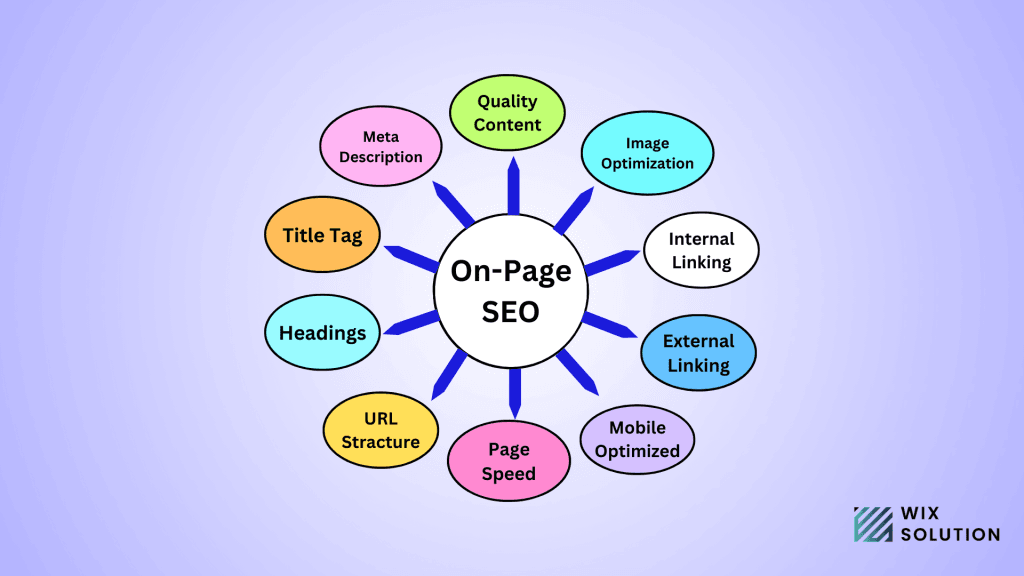
On-page SEO is the process of improving the content and elements of a webpage to help search engines understand what the page is about and make it more useful for visitors.
It includes things like:
Page titles and meta descriptions
Headings and content structure
Keyword relevance and search intent
Images and alternative text
Internal and external links
Clear, descriptive URLs
Page experience and mobile usability
Relevant structured data
Some of these overlap with technical SEO, but you don't need to become a developer to get started.
For example, if you run a mobile bicycle repair business, your service page should clearly explain what repairs you provide, where you operate, how customers can book, and what makes your service suitable for their needs.
A page that only says "We offer the best bike repair services" doesn't answer many useful questions.
A page that describes puncture repairs, brake adjustments, service areas, appointment availability, and booking instructions gives visitors something they can act on.
That's the kind of difference good on-page SEO can make.
If you're still learning the wider SEO process, our Wix SEO guide explains the fundamentals, including keyword research, technical setup, and website optimization.
Why On-Page SEO Still Matters in 2027
Search is changing, but people still need reliable information.
Whether someone uses traditional Google Search, an AI-generated answer, or another search tool, the underlying goal is usually the same: find information that helps them make a decision or solve a problem.
Good on-page SEO makes your content easier to discover, interpret, and use.
However, the relationship between search visibility and website traffic is changing.
What Recent Research Says About AI Search
A July 2025 study from Pew Research Center examined Google search behavior using browsing data from 900 U.S. adults.
Researchers found that users clicked a traditional search result in 8% of visits where an AI summary appeared, compared with 15% of visits without one.
They also found that users clicked a source link directly within an AI summary in only 1% of visits where such a summary appeared.
Another study published by Ahrefs in February 2026 analyzed 300,000 keywords. Its researchers estimated that the presence of a Google AI Overview was associated with a 58% lower average click-through rate for the top-ranking page, after adjusting for wider click-through-rate changes.
These studies use different methods, and their findings shouldn't be treated as predictions for every industry or website.
Still, they highlight an important point: appearing in search results doesn't always produce the same number of clicks it once did.
For business owners, this means your content should do two things well:
Provide useful, trustworthy information that search engines and AI systems can understand.
Give visitors a clear reason to explore your website when they need more than a quick answer.
Let's look at how to do that.
1. Start With Search Intent, Not Just Keywords
Before changing your headings or meta descriptions, think about why someone would search for the topic.
Search intent is the purpose behind a search.
For example, these searches might involve bicycles, but they suggest different needs:
Search query | Likely intention | Best page type |
How to fix squeaky bike brakes | Learn how to solve a problem | Blog tutorial |
Mobile bike repair in Bristol | Find a local repair service | Service or location page |
Bicycle repair cost | Compare prices | Pricing guide |
Book bike repair near me | Arrange a service | Booking or service page |
Creating one page that tries to satisfy all these searches may make it less useful for everyone.
Instead, give each important topic the type of page it deserves.
Your service page should help people decide whether to hire you. Your blog should answer questions, explain processes, and provide useful information.
How to Research Search Intent
Start by searching your main topic on Google.
Look at the type of pages appearing in the results.
Are they tutorials, product pages, service pages, comparison articles, or local business listings?
Then ask:
What questions are these pages answering?
What information do they provide near the beginning?
What might visitors still need to know?
Can I offer a clearer explanation or something genuinely useful that isn't already covered?
You can also use Google Search Console to identify searches that already generate impressions for your website.
If you have access to Ahrefs, Semrush, or another SEO platform, their keyword research tools can provide additional context. But you don't need a paid subscription to understand the basic intent behind a search.
Practical tip: Choose one main topic for each important page and cover relevant supporting questions naturally. Avoid forcing every related keyword into the content.
2. Write Clear SEO Titles and Meta Descriptions
Your SEO title is one of the first things people may notice when your page appears in search results.
It should tell them what they'll find if they click.
Compare these examples.
Weak title: Welcome to Our Professional Services
Better title: Mobile Bicycle Repair in Bristol | Maple Lane Cycles
The second title explains the service and location without relying on exaggerated language.
For a blog article, you might use:
On-Page SEO for Wix Websites: Practical Tips for 2027
A useful title usually includes the page's main topic and makes its purpose obvious.
There isn't a universal character count that guarantees Google will display the entire title. Google may shorten or rewrite titles depending on the search and available display space.
Keep titles concise enough to read comfortably, but prioritize clarity over an exact number of characters.
Write Meta Descriptions for Real People
A meta description summarizes what visitors can expect from the page.
For example:
Need bicycle repairs at your home or workplace? Explore our mobile repair services in Bristol, including puncture fixes, brake adjustments, and bike servicing.
This is more helpful than a generic description such as "We offer quality services at affordable prices."
Google doesn't always display your chosen meta description. It may generate a different snippet using content from the page.
A meta description isn't a direct ranking factor, but a clear description can help someone decide whether your page is relevant.
How to Edit SEO Titles in Wix
For a Wix Blog post:
Open your Wix dashboard.
Go to Blog and select the post you want to edit.
Open its SEO settings.
Under Basics, review the title tag and meta description.
Make the necessary changes and publish.
For a regular Wix website page, open the page's SEO settings from the editor or your site's SEO dashboard.
You can also review individual pages under SEO & GEO → SEO Settings.
Wix provides default SEO settings, but it's worth reviewing important service pages and blog posts individually.
3. Use Headings That Make Your Content Easy to Follow
Headings help visitors understand the structure of your page.
They also give search engines useful context about the topics covered.
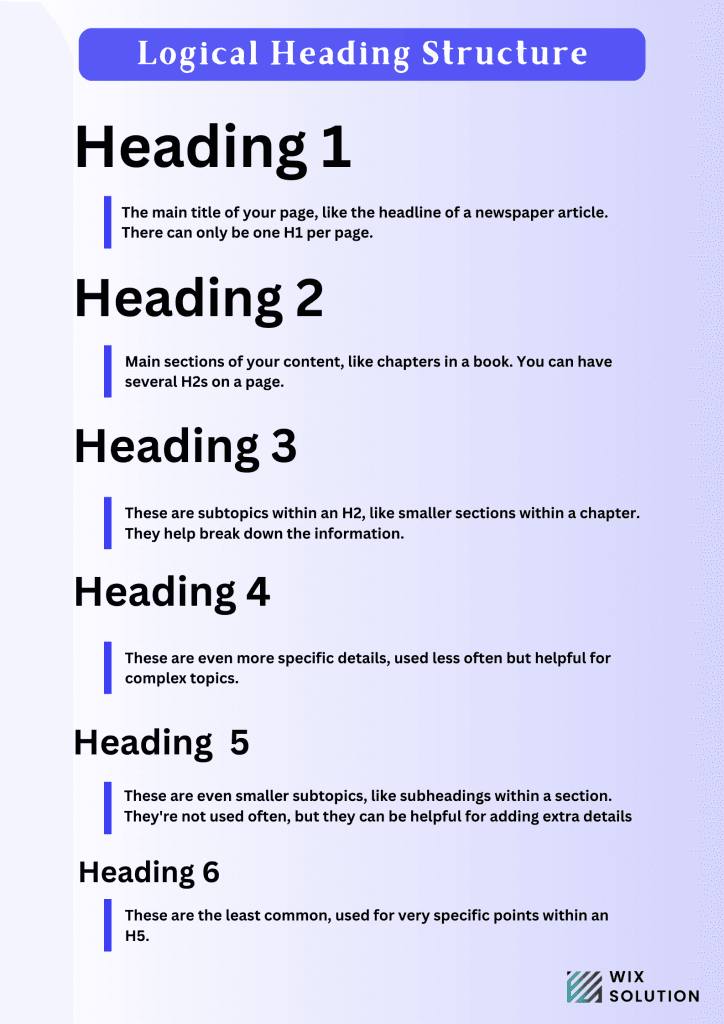
A well-organized page usually has a main heading (H1), followed by section headings (H2) and smaller subheadings (H3) where needed.
For example:
H1: Mobile Bicycle Repair in Bristol
H2: Our Mobile Bicycle Repair Services
H3: Puncture Repairs
H3: Brake and Gear Adjustments
H2: Areas We Cover
H2: How to Book a Repair
H2: Frequently Asked Questions
Notice that the headings describe what customers actually want to know.
You don't need to put your main keyword in every heading.
In fact, repeating the same phrase throughout the page can make the writing feel unnatural.
Use headings to organize information, not simply to insert more keywords.
Also, avoid using heading styles only because you prefer their appearance. In Wix, choose the appropriate heading level and adjust the visual design separately where possible.
4. Create Content That Answers Real Questions
It's easy to write content around keywords and forget about the person reading it.
Imagine someone visits a page about emergency plumbing repairs.
They probably want to know whether the company serves their area, how quickly an appointment can be arranged, what problems it handles, and how to get in touch.
A long introduction explaining the history of plumbing doesn't help much at that moment.
Start by answering the most important question.
Then provide enough detail for visitors to understand their options.
Make Your Content More Useful Than a Generic Summary
Google's people-first content guidance emphasizes original information, trustworthy explanations, and content that meets readers' needs.
Think about what you can contribute beyond definitions and general advice.
For example, a home renovation company could explain:
How customers should prepare before a kitchen renovation
Which decisions commonly delay a project
What affects the final estimate
How the company handles unexpected repair work
What customers should ask before choosing a contractor
These details can help someone make a better decision.
They're also harder to replace with a generic summary.
If you have genuine project photos, technical knowledge, customer questions, or tested processes, use them where relevant.
Don't invent client results or claim first-hand experience you don't have.
If you'd like more writing-focused ideas, our guide to content optimization for SEO covers additional ways to improve website content.
5. Keep Your URLs Simple and Descriptive
A page's URL should be easy to understand.
For example:
Clear URL: example.com/mobile-bike-repair
Less useful URL: example.com/service-page-84739
The first gives visitors and search engines a basic idea of the page's topic.
For new pages, use descriptive words separated by hyphens, and avoid unnecessary repetition.
You don't need to remove every short word or follow a strict character limit.
The goal is readability.
Should You Change Existing URLs?
Not automatically.
If a page has been published for years and already receives traffic or backlinks, changing its URL may introduce unnecessary risk.
For instance, WixSolution's existing article URL is:
It's short, relevant, and easy to understand. There's no need to change it simply because the article title now includes 2027.
If you do need to change a URL, make sure the old address redirects correctly to the new one. Then update important internal links and check the page in Google Search Console.
6. Build Helpful Internal Links Between Your Pages
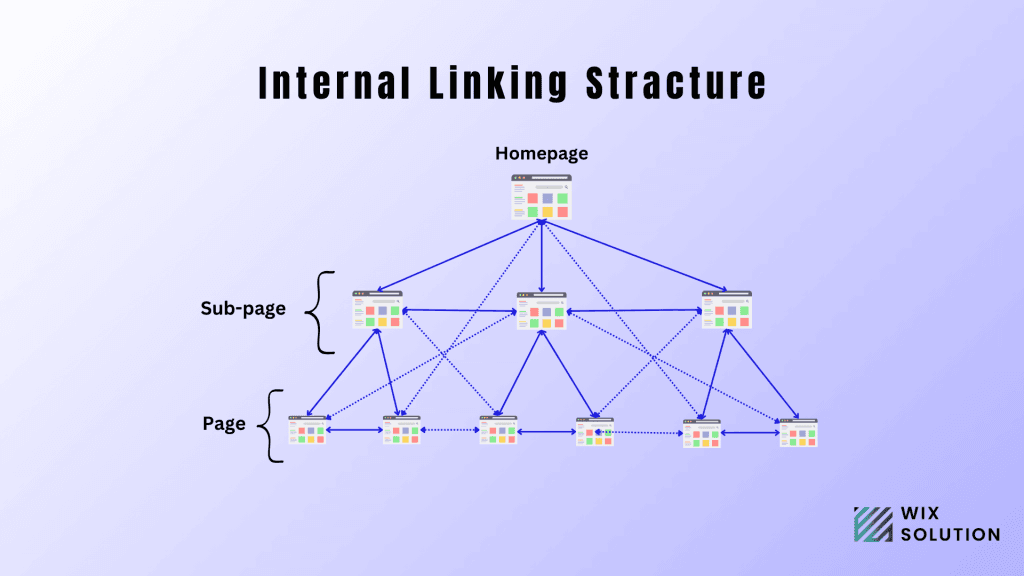
Internal links connect one page of your website to another.
They help visitors find related information and give search engines paths to discover your content.
Let's say someone is reading an article about improving local business visibility.
If that article mentions Google Business Profile, linking to a detailed profile setup guide makes sense.
The reader can continue learning without having to search again.
The same principle applies to service pages, FAQs, and blog articles.
How to Build Better Internal Links
Start by identifying related content on your website.
For example, a local business might have:
A main bicycle repair service page
A page explaining mobile repair appointments
A guide about bicycle maintenance
A page showing service areas
A contact or booking page
These pages can link to one another where the connection is useful. Use descriptive anchor text.
Instead of writing "click here," write something that tells the reader where the link goes.
For example:
"If you operate a service business, these local SEO best practices can help you plan location-relevant content and improve your business information."
This is useful because the linked article supports the topic being discussed.
You don't need to add links to every paragraph. A few relevant links are better than a long collection of unrelated ones.
Also, remember to link to your new content from older relevant pages. Publishing a new article without connecting it to the rest of your site can make it harder for visitors to discover.
7. Optimize Images Without Sacrificing Quality
Images can make a webpage more useful, especially when you're explaining a process or showing products, services, or previous work.
But large, unnecessary images can slow down a page.
Good image optimization is about finding the right balance between quality, accessibility, and performance.
Use Images That Add Information
For a Wix website design tutorial, a screenshot showing the exact settings panel is more useful than a generic photograph of someone working on a laptop.
For a landscaping company, genuine pictures of completed projects can help customers understand the quality and style of work.
Whenever possible, use images that support the surrounding text.
Write Descriptive Alt Text
Alt text describes an image for people using screen readers and helps search engines interpret image content.
For example:
Unhelpful alt text: Best bike repair SEO Bristol bikes
Better alt text: Mechanic adjusting the rear brake on a customer's bicycle
The second description explains what the image shows.
You don't need to squeeze keywords into every image description.
For purely decorative images that convey no additional information, an empty alt attribute may be more appropriate than a repetitive description.
Reduce Unnecessary Image Weight
Use appropriately sized images and modern formats when suitable.
Wix includes image optimization features, but that doesn't mean every uploaded asset will automatically give you the best possible performance.
Avoid uploading extremely large images when much smaller dimensions would work.
You can also use tools such as Squoosh to compare image quality and file size before uploading.
Finally, check how images display on mobile. A graphic that's easy to read on a laptop may become almost impossible to understand on a phone.
8. Use External Links When They Help Readers
You don't have to keep readers on your website at all costs.
Sometimes the most useful thing you can do is direct them to a reliable source.
For instance, if you're explaining Google's indexing requirements, linking to the official Google Search Central documentation gives readers a place to verify the information.
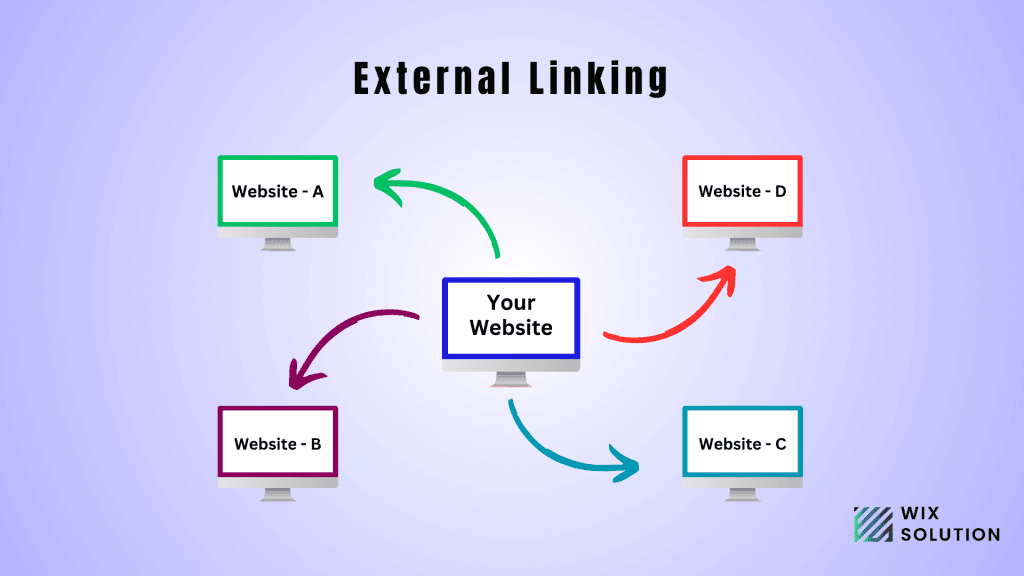
External links are especially useful when you:
Reference research or statistics
Explain technical requirements
Discuss platform policies
Recommend a tool or resource
Refer to information that changes frequently
Choose sources based on relevance and reliability, not simply because a website is popular.
And don't assume that adding external links automatically improves rankings.
Their main purpose is to support your content and help readers find accurate information.
For sponsored or paid links, use the appropriate link attributes. Ordinary editorial links to trustworthy resources don't need to be marked nofollow just because they lead to another website.
9. Improve Mobile Usability and Page Performance
A webpage can have excellent content and still frustrate visitors if it loads slowly or is difficult to use.
That's why page experience deserves attention during an on-page SEO review.
Start with the mobile version of your website.
Check whether:
Text is comfortable to read without zooming
Buttons are easy to tap
Images fit the screen
Important information appears without excessive scrolling
Pop-ups don't block the main content
Forms are easy to complete
You should also measure performance rather than guessing.
Understand Core Web Vitals
Google uses three Core Web Vitals metrics to evaluate important aspects of user experience.
Metric | What it measures | Good target |
Largest Contentful Paint (LCP) | How quickly the main visible content loads | 2.5 seconds or less |
Interaction to Next Paint (INP) | How responsive the page feels during interactions | 200 milliseconds or less |
Cumulative Layout Shift (CLS) | How much visible content unexpectedly moves | 0.1 or less |
These thresholds come from Google's Core Web Vitals documentation.
You can test a page using Google PageSpeed Insights.
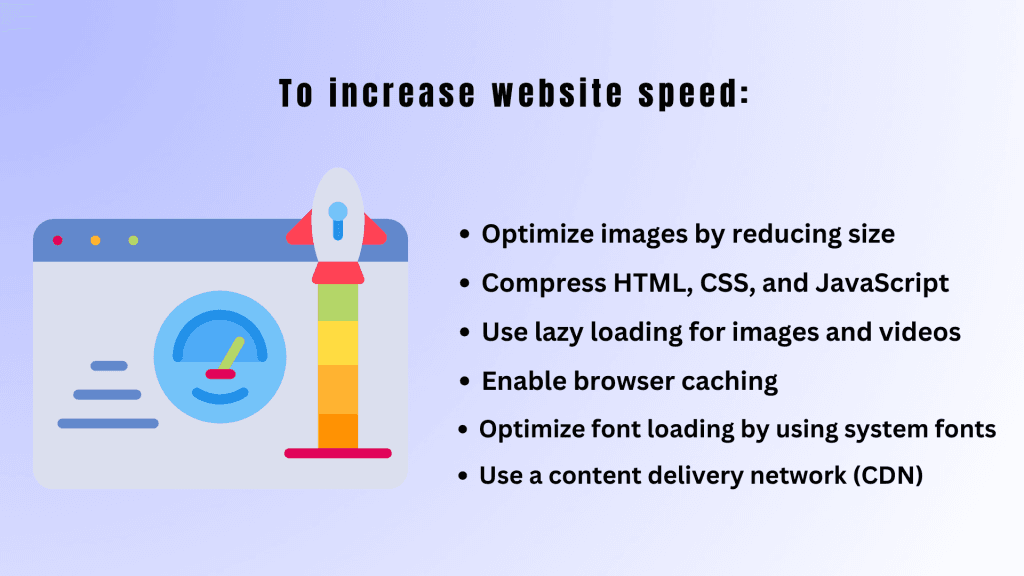
For Wix website owners, useful things to check include oversized media, unnecessary animations, third-party widgets, and mobile layouts that are unnecessarily complicated.
Don't delete a useful feature simply to improve a test score, though. Consider whether the change would genuinely improve the visitor's experience.
Core Web Vitals are worth improving, but good scores alone won't guarantee higher rankings.
10. Check Structured Data Without Adding Unnecessary Markup
Structured data is code that describes certain types of content in a format search engines can interpret.
For example, structured data can help identify information about an article, product, organization, or business.
It may also help a page qualify for supported search features.
The important distinction is that structured data doesn't guarantee rankings, rich results, or placement in AI-generated answers.
Does Wix Automatically Add Structured Data?
For several page types, yes.
Wix automatically provides preset structured data for blog posts, including BlogPosting markup.
This can identify information such as the article headline, author, image, and publication details.
You can review structured data through your Wix SEO settings and use Google's Rich Results Test to check supported markup.
You don't need to manually add another BlogPosting schema simply because an SEO checklist tells you to.
If you add custom or AI-generated structured data, make sure it accurately describes information that actually exists on the page.
Also, don't add FAQ schema to every article expecting enhanced search results.
Google limits FAQ rich results to eligible authoritative government and health websites.
A well-written FAQ section can still be useful for readers without special markup.
11. Optimize Your Content for AI Search Without Chasing Tricks
AI-powered search deserves attention, but it doesn't require you to abandon traditional SEO.
Google's official guidance on optimizing for generative AI search makes an important point: foundational SEO practices remain relevant.
Google describes how AI search systems may retrieve relevant pages, combine information from multiple sources, and use that information to answer more complex questions.
This means search visibility increasingly depends on how well your content helps answer a question, not just whether it includes a particular keyword.
What Does AI-Friendly Content Look Like?
Consider two pages about cleaning a stained sofa.
The first gives a generic answer:
"Use suitable cleaning products and follow the correct procedure."
The second explains what to check before cleaning, how fabric types affect the process, when to stop treating a stain, and when professional cleaning may be appropriate.
The second page offers more useful detail.
It doesn't need special AI terminology or a complicated format. It simply answers the question more thoroughly.
Practical Ways to Make Your Content Useful for AI Search
Answer the main question clearly. Don't make readers work through several paragraphs before finding the information they came for.
Cover relevant follow-up questions. If someone asks how much a repair costs, they may also want to know what changes the price.
Use original information. Genuine examples, tested methods, project observations, and relevant evidence can make your content more distinctive.
Explain the context. A recommendation that works for one type of business may not work for another. Tell readers when your advice applies.
Keep important information in readable text. Don't put every useful instruction inside an image, animation, or video without a text explanation.
Cite reliable sources. If you use research findings, link to the original research and explain what the data actually measures.
Make the page accessible. Search engines need to be able to crawl and index your content to consider it for search features.
Do You Need GEO, AEO, or Special AI Schema?
You may come across terms such as:
Generative Engine Optimization (GEO)
Answer Engine Optimization (AEO)
AI Search Optimization
These terms describe efforts to improve visibility in AI-generated answers.
Some related work can be valuable, such as making your content easier to understand, improving source credibility, and answering specific questions.
However, there isn't a special schema tag that guarantees inclusion in Google AI Overviews or AI Mode.
Google has also cautioned against treating tactics such as unnecessary AI-specific text files or artificial content formatting as shortcuts to visibility.
Focus first on creating content that is clear, original, accessible, and genuinely helpful.
What About ChatGPT and Other AI Search Tools?
Google isn't the only place people look for information.
AI assistants and other search experiences may retrieve, summarize, or cite information from websites.
Their systems don't all work in the same way, so you shouldn't assume a technique that affects one platform will produce the same result everywhere.
The practical starting point is still to publish accurate information that people can find, understand, and verify.
For businesses, clearly explaining your services, location, policies, expertise, and contact details remains worthwhile.
12. Show Who Created Your Content and Why It Can Be Trusted
People want to know whether advice comes from someone who understands the topic.
This is particularly important when you're discussing technical services, health, finance, or decisions that could have serious consequences.
Google often discusses experience, expertise, authoritativeness, and trustworthiness using the term E-E-A-T.
E-E-A-T isn't a single ranking score you can improve by adding a badge or repeating claims about your expertise.
Instead, consider how your website demonstrates credibility.
For example:
Identify the author or reviewer when appropriate.
Explain relevant experience accurately.
Include original photographs or screenshots.
Support important claims with reliable sources.
Keep business information and contact details accurate.
Correct outdated information when you find it.
If you're writing about a Wix feature you've used, showing the actual settings screen and explaining what happened is more convincing than saying you're an expert without evidence.
You don't need to share private client details or manufacture a case study.
A well-explained example, an accurate technical walkthrough, or an honest limitation can be valuable on its own.
13. Make Your Website Easy to Use After Someone Clicks
On-page SEO shouldn't end when someone reaches your website.
Think about what you want visitors to do next.
If they land on a service page, can they understand what you offer and how to contact you?
If they're reading a tutorial, can they follow the instructions without guessing?
If they're comparing options, does your page explain the important differences?
For a service business, useful elements may include a clear explanation of the service, relevant examples, frequently asked questions, and an obvious contact option.
For a blog, a well-organized article and a few relevant internal links may be enough.
Avoid filling every section with promotional buttons.
A call to action works best when it follows naturally from the information the visitor has just read.
14. A Complete On-Page SEO Example for a Wix Service Page
Let's put these recommendations together.
Imagine a fictional business called Maple Lane Cycles, which offers mobile bicycle repairs in Bristol.
Its website has a service page, but the content is vague.
Before Optimization
Page title: Our Services
H1: Welcome to Maple Lane Cycles
Main content:
"We offer excellent bicycle services at competitive prices. Our team is dedicated to customer satisfaction. Contact us today to learn more."
Nothing here explains the specific service, location, or booking process.
Someone searching for mobile bicycle repair may not immediately recognize this as the right page.
After Optimization
SEO title: Mobile Bicycle Repair in Bristol | Maple Lane Cycles
H1: Mobile Bicycle Repair in Bristol
Meta description:
Book bicycle repairs at your home or workplace in Bristol. Explore puncture repairs, brake adjustments, gear tuning, and mobile servicing.
Revised introduction:
"Need your bicycle repaired but can't get it to a workshop? Maple Lane Cycles offers mobile bicycle servicing at homes and workplaces across its listed Bristol service areas. We handle common repairs such as punctures, brake adjustments, and gear problems. Check our services below to see what we can help with and how to arrange an appointment."
Suggested page sections:
Mobile Bicycle Repair Services
Puncture and Tyre Repairs
Brake and Gear Adjustments
Areas We Cover
How Our Booking Process Works
Frequently Asked Questions
Suggested image alt text: Bicycle mechanic adjusting a rear derailleur during a mobile repair appointment
Relevant internal link: A guide about common bicycle maintenance problems
Main call to action: Request a Repair Appointment
This is an illustrative example, not a real client project or a claim about search results.
Notice what changed.
The revised page explains what the business does, who the service is for, and how customers can take the next step.
The keyword is included naturally, but the page isn't built around repeating it.
That's a more useful approach to on-page optimization.
15. Measure Your Results and Keep Improving
Once you've optimized a page, give search engines time to process the changes and monitor what happens.
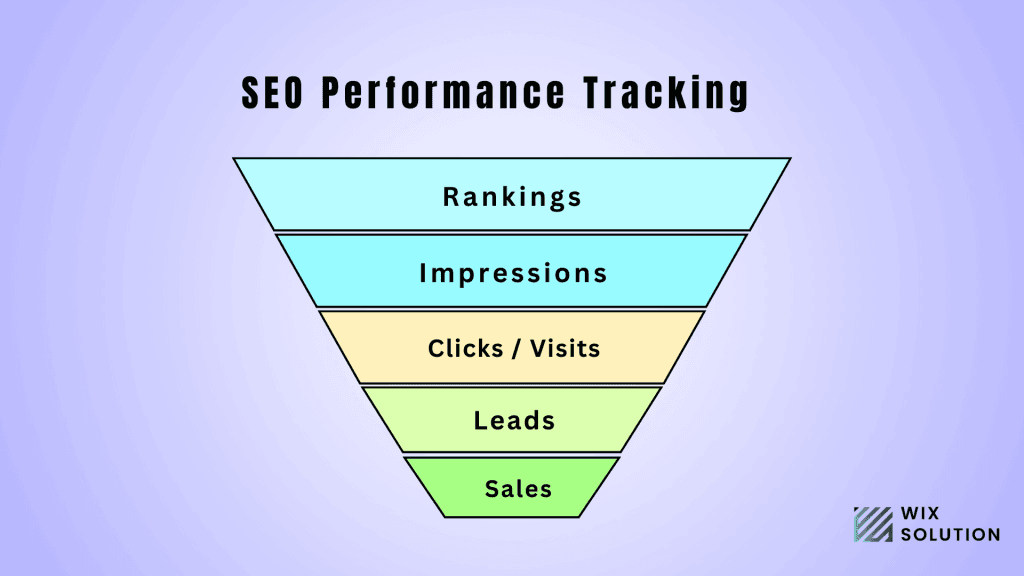
Google Search Console is a useful place to start.
Look at impressions, clicks, average positions, and the searches that lead people to your pages.
But don't rely on rankings alone.
For a business website, you should also review what happens after someone visits.
Do they contact you? Request a quote? Book an appointment? Visit an important service page?
Those actions can tell you more about the business value of your traffic.
How to Identify What Needs Improvement
What you're seeing | What to investigate |
Very few impressions | Indexing, keyword relevance, search intent, and internal links |
Impressions but few clicks | Titles, search snippets, competing search features, and query intent |
Clicks but few inquiries | Content clarity, visitor expectations, usability, and calls to action |
Poor mobile performance | Images, scripts, layout, and Core Web Vitals |
Several pages competing for similar queries | Content overlap and whether each page serves a distinct purpose |
Remember that AI-generated search features can change how often people click, even when your content remains visible.
Look at trends over time rather than reacting to every daily fluctuation.
You can also carry out a more complete review using our guide to a free SEO website audit.
When Should You Update Your Content?
Update a page when something meaningful changes.
That might include:
Outdated instructions or screenshots
Changed product or service information
New research that affects your recommendations
Broken internal or external links
Customer questions the page doesn't answer
Important information missing compared with current user needs
You don't need to rewrite a useful article every few weeks simply to change its publication date.
An accurate, well-maintained page is more valuable than one that appears new but still contains old information.
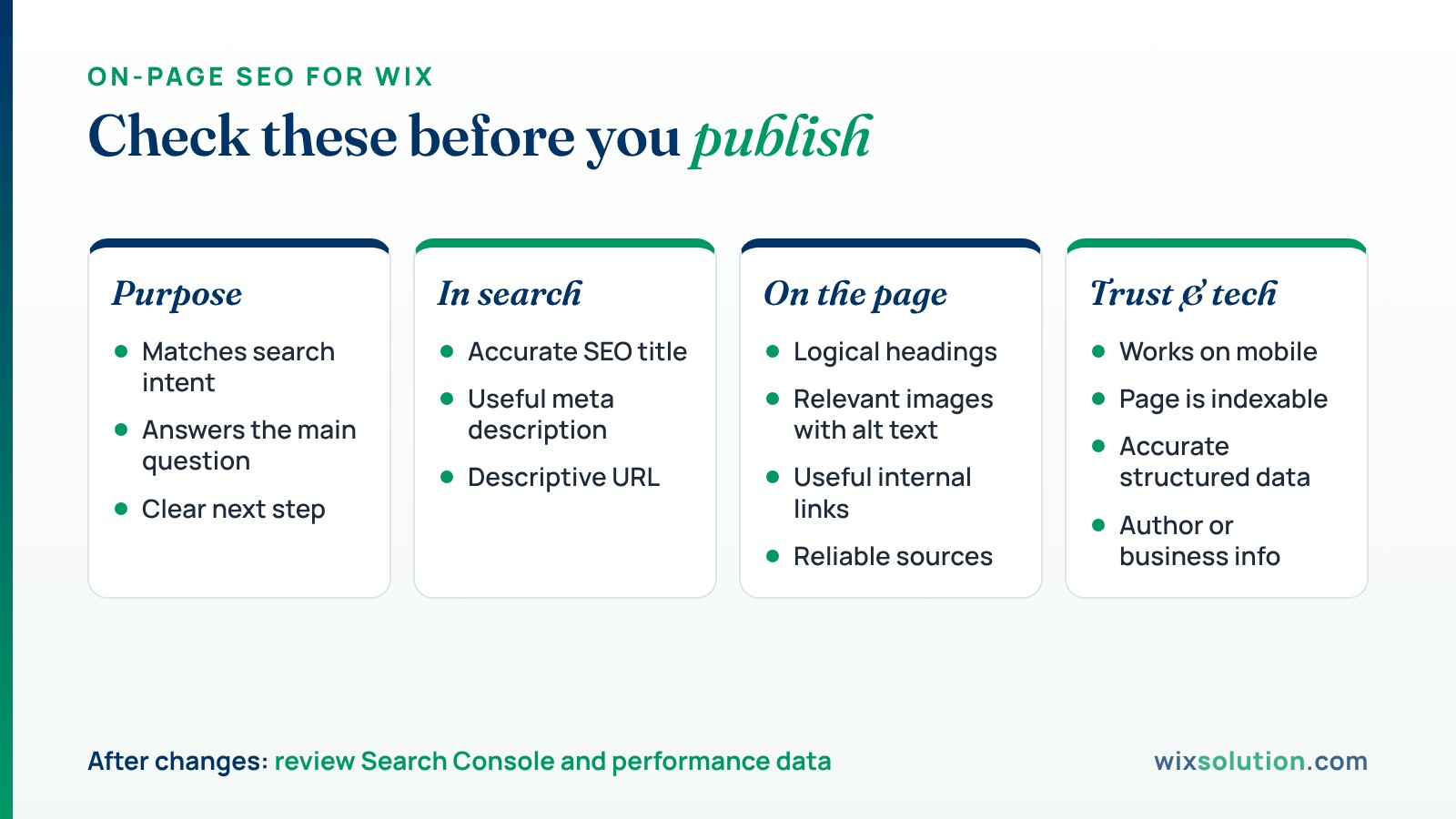
Quick On-Page SEO Checklist for Wix Websites
Before publishing or updating an important page, review these points:
The page has a clear purpose and matches the likely search intent.
The SEO title accurately describes the content.
The meta description gives visitors a useful summary.
The main heading and section headings follow a logical structure.
The content answers the main question without unnecessary filler.
The URL is descriptive, and existing URLs are preserved unless a change is needed.
Images are relevant, accessible, and appropriately sized.
Internal links connect to genuinely useful pages.
Important claims have reliable supporting sources.
The page works well on mobile devices.
Structured data is accurate and isn't duplicated unnecessarily.
The page has appropriate author or business information.
Visitors can easily find the next step.
The page is indexable if it's intended to appear in search.
Search Console and website performance data are reviewed after changes.
You don't need to perfect every detail before publishing.
Start with accuracy, usefulness, and the problems most likely to affect visitors.
Frequently Asked Questions About On-Page SEO
Does On-Page SEO Work on Wix Websites?
Yes. Wix provides controls for SEO titles, descriptions, URLs, headings, image alt text, indexing settings, and structured data.
You can also create internal links, organize content, and connect your website to tools such as Google Search Console.
Your website platform doesn't remove the need for useful content and a clear SEO strategy.
How Many Keywords Should I Use on One Page?
There isn't a universal number. Choose a main topic and use the words people naturally associate with it.
You can include related terms when they make sense, but avoid repeating phrases simply to achieve a particular keyword density.
Are Meta Descriptions a Google Ranking Factor?
Google doesn't use the meta description as a direct ranking signal.
However, a helpful description may influence whether someone chooses to visit your page when Google uses it in search results.
It's worth writing one, especially for important pages.
Can AI-Generated Content Rank on Google?
AI-assisted content isn't automatically excluded from Google Search.
What matters is whether the final content is helpful, accurate, reliable, and created in line with Google's policies.
Using AI to organize ideas or help with drafting can be useful. Publishing large amounts of unreviewed, repetitive content simply to attract rankings is a different matter.
Review factual claims, add your own expertise where appropriate, and make sure the finished content serves readers.
Is On-Page SEO Enough to Rank a Website?
Not always. On-page SEO is important, but search visibility can also depend on technical accessibility, competition, links, business reputation, and other factors.
A useful page still needs to be discoverable and eligible for indexing.
Does AI Search Optimization Require Special Tools?
Not necessarily. Start with the same things that improve a website for people: clear explanations, relevant information, accurate sources, and accessible pages.
Specialized tools may help you monitor AI search visibility, but they can't guarantee that a particular AI system will recommend or cite your website.
Final Thoughts
Good on-page SEO isn't about adding as many keywords as possible or satisfying every recommendation from an SEO tool.
It's about making your website useful for the people you're trying to reach.
That means understanding what they search for, explaining your services clearly, answering important questions, and making your content easy to navigate.
The growing use of AI search makes original and trustworthy information even more worth investing in. But the fundamentals haven't disappeared.
For Wix website owners, the practical starting point is simple: choose an important page, review it from a customer's perspective, fix the most obvious gaps, and measure what happens afterward.
Small, thoughtful improvements are usually easier to manage than changing everything at once.
And if you're not sure where to start, WixSolution provides Wix SEO services to help businesses review their websites, identify practical improvements, and build an SEO plan around their goals.
You can also explore our guide to improving website traffic with SEO for additional ideas beyond on-page optimization.


