
How to Improve SEO on Wix: A Practical Plan for 2027
Your Wix website may already have good content, clear navigation, and properly configured SEO settings. But that doesn't always mean it's attracting the right visitors.
Sometimes a page gets plenty of impressions but few clicks. Other times, visitors arrive but leave without contacting you.
Improving SEO starts with understanding what's happening and deciding which changes are worth making.
This guide explains how to find opportunities in your existing Wix website, prioritize improvements, and measure results without wasting time on unnecessary SEO tasks.
Start by Understanding What Your Website Needs
Before changing anything, ask a simple question: what isn't working?

A website that barely appears in Google Search has a different problem from one that receives visitors but generates very few inquiries.
For example, a plumbing company's service page might receive 200 visits from people searching for repairs in its area. A general blog post might receive 2,000 visits from people looking for DIY advice.
The blog gets more traffic, but the service page could be more valuable if it attracts customers ready to book.
That's why rankings and visitor numbers shouldn't be your only measures of success.
For a service business, you might focus on qualified inquiries. An online store may prioritize sales, while a consultant might track booked appointments.
Once you know what matters, it's easier to decide where your SEO work should begin.
If your website is new and you haven't completed the basic setup, start with our Wix SEO guide. This article focuses on improving a website that's already published.
Find Your Biggest SEO Opportunities in Google Search Console
Google Search Console is one of the best places to start because it shows how people discover your pages through Google Search.
Open your Search Console property and go to Performance → Search results.
You'll see information about clicks, impressions, click-through rate (CTR), and average position.
Instead of looking only at your website's total traffic, open the Pages report and examine individual URLs.
Select a page, then switch to Queries to see which searches are associated with it.
You can also compare the last three months with the previous three months. For seasonal businesses, comparing similar periods year over year may be more meaningful.
What Should You Look For?
Different patterns suggest different problems.
What you're seeing | What to investigate |
An important page has almost no impressions | Check indexing, search demand, and whether the page matches relevant queries. |
A page gets impressions but few clicks | Review the queries, search results, page title, and whether other search features satisfy the query. |
Visitors arrive but rarely contact you | Review the content, offer, contact process, and conversion tracking. |
A previously successful page loses traffic | Compare equivalent periods and check whether the content or search results have changed. |
Most traffic comes from your business name | Look for opportunities to reach people who don't already know your brand. |
These are starting points, not automatic diagnoses.
A low CTR doesn't always mean your title is poor. For some searches, people get the answer directly from Google without visiting a website.
Likewise, a decline in traffic doesn't necessarily mean something is technically wrong.
The goal is to understand the reason before making changes.

Separate Branded and Non-Branded Searches
One useful Search Console improvement arrived in 2026.
Google expanded its branded queries filter to all eligible websites in March 2026.
The filter separates searches related to your business name from searches that don't directly mention your brand.
For example, "Maple Home Repairs phone number" would typically be a branded search, while "washing machine repair in Leeds" would be non-branded.
This distinction helps you understand whether people are finding you because they already know your company or because they're discovering your services through search.
You can read more in Google's announcement about branded query reporting.
Improve the Pages That Matter Most
Once you've reviewed the data, resist the urge to change every page.
A useful approach is to begin with pages that have business value and realistic opportunities for improvement.
These are often service pages, important product pages, or articles that support customer decisions.
A Practical Example
Imagine a fictional cleaning company with two pages.
Its homepage receives steady traffic, mostly from people searching for the company by name.
Its end-of-tenancy cleaning page receives search impressions for relevant queries but very few clicks.
The second page may deserve attention because it reaches people actively researching a service the business sells.
You could review how the page appears in search results, whether its content matches the query, and what competing pages explain.
Perhaps the page doesn't say which areas the company covers, whether cleaning supplies are included, or how customers can request a quote.
Adding those details may make it more useful.
You don't need to rewrite the entire website to address a few missing answers.
Think About Impact and Effort
A simple way to prioritize SEO work is to consider three questions.
How important is this page to the business? Is there evidence of an opportunity or problem? How much work will the improvement require?
For example, fixing an important page that's accidentally excluded from indexing may deserve immediate attention.
Updating a service page that receives relevant impressions but lacks essential information may also be worthwhile.
Changing a decorative image on an old article with little traffic and no business relevance is usually less urgent.
This approach helps you avoid spending hours on minor details while more meaningful issues remain unresolved.
Update Existing Content Before Publishing More
Creating new blog posts can be useful, but it shouldn't be your automatic response to slow SEO growth.
Sometimes your existing content already covers the right topic. It simply needs better information.

Start by reviewing pages that previously performed well or already receive relevant search impressions.
Check whether the advice is still accurate, the examples remain useful, and the article answers the questions readers are asking.
For instance, imagine you published an article about website booking systems two years ago.
Since then, the platform has introduced new features, changed its interface, or removed certain options.
Updating those instructions would be more helpful than publishing another article covering almost the same subject.
Add Information That Readers Can't Find Everywhere
Before editing, compare your article with other useful results for the same topic.
Look for missing explanations, unclear instructions, and unanswered questions.

You might improve the page by adding an actual example, explaining when a recommendation doesn't apply, or showing a screenshot of a feature you've tested.
Google's helpful content guidance encourages original information, clear sourcing, and content that provides value beyond simply repeating existing material.
That doesn't mean every article needs original research.
A clear explanation based on genuine experience can also be valuable.
For more detailed writing and editing advice, see our content optimization guide.
Make Sure Your Pages Aren't Repeating Each Other
As a website grows, it's easy to create several pages that cover nearly the same topic.
You might publish one article about improving website SEO, another about SEO best practices, and a third about optimizing your website for Google.
Those articles aren't automatically a problem.
However, if they answer the same questions in almost the same way, readers may not gain much from having three separate pages.
Before publishing new content, review what you already have.
If two pages serve different purposes, make the distinction clear.
For example, one article could explain how to set up SEO tools, while another focuses on analyzing existing performance and deciding what to improve.
If two pages are nearly identical, consider whether they should be combined into a stronger resource.
Be careful when removing published pages, especially if they receive traffic or backlinks. Where appropriate, redirect retired URLs to a closely relevant replacement.
Give Each Important Page a Clear Role
Your homepage should introduce the business. Service pages should explain what customers can hire you for. Blog articles should answer related questions and help people explore the topic.
When these pages serve different purposes, they can support each other through relevant internal links.
If you're organizing a service website, our website structure guide explains how to connect essential pages without making the navigation unnecessarily complicated.
Give Visitors a Reason to Trust Your Business
Search visibility is useful, but people still need to decide whether they should contact you.
Imagine two companies offering the same repair service.
The first website says, "We're the best repair experts with unbeatable customer satisfaction."
The second explains which repairs it handles, how appointments work, what affects pricing, and who will perform the service.
The second page provides information that helps someone make a decision.
This is where genuine experience matters.
If your business has completed relevant projects, explain the work involved. If your team has professional qualifications, provide accurate details. If customers regularly ask the same questions, answer them clearly.
You don't need to exaggerate your experience or invent impressive results.
Be Clear About Who Created the Content
For educational articles, consider including an author or reviewer with relevant experience.
If you've tested a Wix feature, explain what you did and when the information was checked.
If you reference research or technical guidance, link to the source so readers can verify it.
Google's E-E-A-T framework considers experience, expertise, authoritativeness, and trustworthiness when discussing content quality.
It isn't a separate numerical ranking score.
The practical lesson is to make your information accurate, useful, and easy to trust.
Fix Technical Problems Based on Their Actual Impact
Wix handles several technical SEO tasks automatically, including generating XML sitemaps and providing default settings for supported page types.

That doesn't mean technical issues never happen.
An important page might be blocked from indexing, a redirect may point to the wrong destination, or an old URL could stop working after a website update.
These problems deserve attention because they can affect whether visitors and search engines can reach your content.
Use Wix Site Inspection
Wix Site Inspection provides information about how Google has crawled and indexed your website's pages.
You can find it through SEO & GEO → Tools and settings in your Wix dashboard.
The tool uses information from Google Search Console to help identify discoverability and indexing issues.
Before running an inspection, your website needs to be published, connected to a domain, and verified with Google Search Console.
When reviewing the report, focus on important pages that should be indexed.
Not every excluded URL represents a problem. Some pages may intentionally be excluded or may redirect elsewhere.
If you need a full technical walkthrough, see our technical SEO guide.
There's little value in fixing every minor warning while ignoring a service page that customers cannot access.
Check What Happens After Visitors Reach Your Website
SEO can bring people to your website, but it can't complete the customer journey for them.
Suppose a service page starts receiving more visitors, yet inquiries remain unchanged.
Before making another round of keyword changes, open the page on your phone.
Can you understand the service immediately? Is pricing or the quotation process explained? Is the contact button easy to find? Does the form work?
Sometimes the problem is less about search visibility and more about what happens after someone clicks.
Measure the Actions That Matter
Google Search Console shows search performance, while Google Analytics and Wix Analytics can help you investigate website activity.
For a service business, useful outcomes might include submitted inquiry forms, confirmed bookings, or completed purchases.
Be careful with how you interpret these metrics.
Someone clicking a phone number doesn't necessarily mean they completed a call. Someone opening a booking page doesn't necessarily mean they made an appointment.
Where possible, track confirmed actions rather than assuming every interaction represents a new customer.
Improving a page's contact process may help your business even when its Google ranking doesn't change.
Promote Useful Content Beyond Your Website
SEO doesn't happen entirely inside your Wix dashboard.
People may discover your business through professional communities, industry publications, partner websites, social platforms, and recommendations.
For example, a local interior designer could contribute practical advice to a home renovation publication.

A specialist repair company might publish a useful troubleshooting resource that suppliers or industry organizations want to reference.
These activities can introduce your business to relevant audiences and sometimes lead to valuable backlinks.
However, social media likes and shares aren't a shortcut to better Google rankings.
Think of promotion as a way to help the right people discover useful content, rather than a method of manipulating search algorithms.
If your business serves a specific city or region, our local SEO best practices cover the additional work involved in local visibility and business listings.
Pay Attention to AI Search and New Search Console Reports
SEO now involves more than traditional blue links in Google Search.
People can discover information through AI Overviews, AI Mode, visual searches, and other search experiences.
For website owners, the challenge is understanding whether these changes affect visibility and customer behavior.
Track Visibility in Google's AI Search Features
In June 2026, Google announced separate Search Console performance reports for generative AI features.
According to Google's official announcement, the reports were made available worldwide by August 31, 2026.
They help website owners examine impressions from AI experiences such as AI Overviews and AI Mode, including the pages shown, countries, devices where available, and changes over time.
This provides more specific visibility information than relying entirely on third-party estimates.
However, an AI impression isn't a customer inquiry, and appearing in an AI-generated response doesn't guarantee traffic.
Use these reports alongside your regular search performance and website analytics.
Don't Ignore Visual Search
Google also introduced new multimodal search reporting in September 2026.
This includes information about searches that use images, such as Google Lens and Circle to Search.
For businesses that rely heavily on visual content, this may provide useful insights.
A furniture retailer, interior designer, or product-focused business may discover that some people find its content through images rather than typed queries.
That makes genuine, descriptive photos and accessible product or service information worth maintaining.
You can read about the update in Google's multimodal search reporting announcement.
What About Wix's AI Visibility Tools?
Wix also provides an AI Visibility Overview for eligible Premium websites.
It can test how selected AI platforms mention or cite your website in responses to generated questions.
These reports may help you understand how your business is represented, but the scores depend on the questions being tested. They aren't a complete measurement of every real AI search.
According to Wix's AI Visibility documentation, results can vary between tests and platforms.
Treat AI visibility reports as another source of information, not a ranking target you need to chase.
Google's guidance for generative AI search also makes clear that useful content and established SEO practices remain the foundation. Special AI files or artificial formatting tricks aren't required.
Build a Simple Monthly SEO Improvement Routine
You don't need to make major changes to your website every week.
A consistent review process can help you make better decisions.
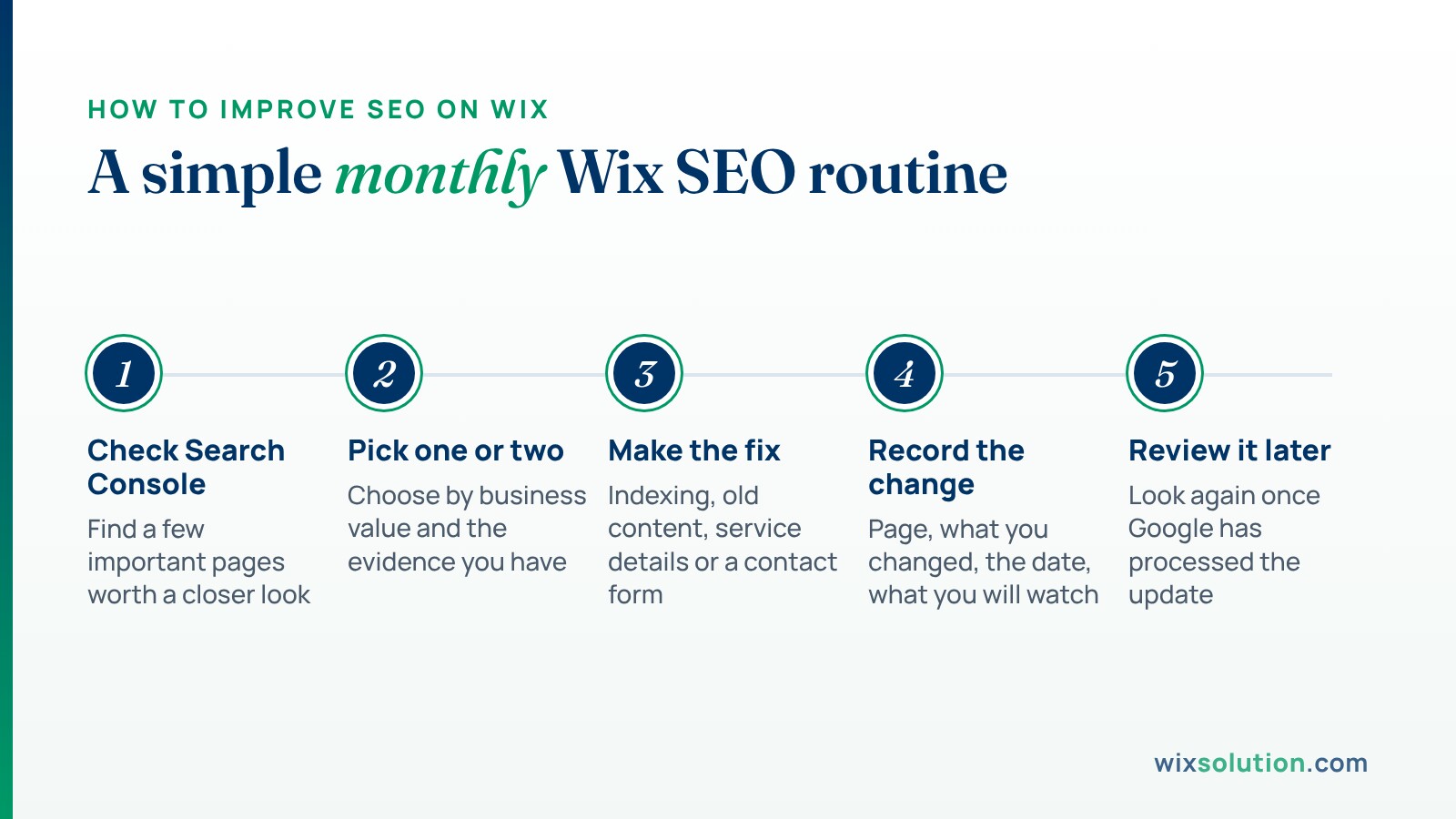
At the beginning of the month, open Google Search Console and identify a few important pages worth investigating.

Choose one or two opportunities based on their relevance to your business and the evidence available.
Make the necessary improvements, whether that involves correcting an indexing problem, updating an article, clarifying a service description, or improving a contact form.
Record what you changed and when.
Then review the page again after Google has had time to process the update.
Keep a Record of Your Changes
A simple spreadsheet is enough.
Record the page URL, the issue you identified, the change you made, the date, and the performance metrics you're monitoring.
For example:
Page | Change made | What to monitor |
Main service page | Clarified service coverage and appointment process | Relevant impressions, clicks, and inquiries |
Older blog article | Updated outdated information and examples | Search queries and organic visits |
Contact page | Simplified the inquiry form | Successful form submissions |
Important landing page | Resolved an indexing issue | Indexing status and search visibility |
Don't expect every change to produce an immediate increase in rankings.
Search results can change for many reasons, including competition, seasonality, and differences in how people search.
Over time, these records will help you understand which improvements are useful for your website.
Frequently Asked Questions
What's the Best Way to Improve SEO on an Existing Wix Website?
Start by reviewing Google Search Console and identifying which important pages have indexing problems, weak search performance, or declining visibility.
Then compare those findings with the actions you want visitors to take.
Focus on the pages where improvements are likely to matter most to your business.
Should I Update Old Blog Posts or Publish New Ones?
Both can be useful.
If an existing article already covers a relevant topic but contains outdated information or incomplete answers, updating it may be worthwhile.
Publish new content when you've identified a distinct customer question or topic that your website doesn't already address.
Avoid creating multiple articles that repeat the same information without adding value.
Why Is My Wix Website Getting Impressions but Few Clicks?
There are several possible reasons.
Your page may appear for queries it doesn't fully answer, rank in a less visible position, or compete with search features that provide information directly.
Review the actual queries and search results before changing the page title or description.
Can I Improve Wix SEO Without Paid Tools?
Yes.
Google Search Console, Google Analytics, and Wix's built-in SEO settings provide useful information for identifying and correcting many common issues.
Paid tools can help with larger projects and more detailed competitor research, but they're not required for every website.
Do I Need Separate SEO Strategies for Google and AI Search?
Not entirely.
For Google's AI search features, the same fundamental requirements remain important: accessible pages, useful content, accurate information, and clear website structure.
You can monitor AI visibility separately, but no optimization method guarantees that an AI system will recommend your business.
Conclusion
Improving Wix SEO is easier to manage when you work from evidence rather than trying every available tactic.
Review your search performance, focus on pages that matter to your business, and make changes that genuinely help visitors.
If you're unsure which improvements to prioritize, start with a website SEO audit or explore WixSolution's SEO services for help reviewing your website.


