
What Is SEO? A Starting Guide for Small Businesses in 2027
Updated: Nov 9
You have a website for your business, but how do people find it when they don't already know your name?
Search engine optimization (SEO) helps make your website more discoverable when people search for relevant products, services, or information.
You don't need to be an SEO expert to understand the basics. This guide explains how SEO works, why it matters for small businesses, and where to begin if your website runs on Wix.

What Is Search Engine Optimization?
Search engine optimization is the process of improving your website so search engines can understand its content and people can find it through relevant searches.
For example, imagine you run a furniture assembly service in Leeds.
Someone searching Google for "furniture assembly in Leeds" may be looking for a local business that can assemble a wardrobe, desk, or bed.
If your website clearly explains those services, the areas you cover, and how customers can book, it provides information that is relevant to that search.
SEO helps connect your website with people who may be looking for what you offer.
It doesn't guarantee your business will appear first, but it can improve your chances of being discovered.
What Does Organic Search Mean?
Organic search results are the unpaid listings shown by search engines.
Unlike paid advertisements, you don't pay Google for each click from an organic result.
However, that doesn't make SEO completely free.
Creating useful pages, researching search demand, maintaining your website, and monitoring performance all require time or resources.
Google also displays different search features, including local business listings, images, and AI-generated answers.
Not every search will produce the same type of results, and not every search leads to a website visit.
For a broader introduction, Google provides an official SEO Starter Guide.
How Does Google Find and Rank Websites?
Before your website can appear in Google's organic results, Google needs to discover and process its pages.
This generally involves three stages.
Crawling: Google uses automated programs to discover webpages and examine their content. It can find pages by following links and through other discovery methods, including sitemaps.
Indexing: Google analyzes the content and may add information about the page to its search index. Not every crawled page is indexed.
Ranking and displaying results: When someone searches, Google evaluates available information and chooses results it considers relevant and useful for that query.
For example, Google may find your furniture assembly service page, process its content, and consider it for relevant searches.
But simply being indexed doesn't mean it will rank prominently.
Google considers multiple signals, and results can vary depending on factors such as the query, location, and device.
If you want a more detailed explanation, our guide to Google's ranking systems covers how search results are selected.
Why SEO Matters for Small Businesses
Small businesses often have limited marketing budgets and compete with companies that are more established.
SEO gives them an opportunity to reach people who are actively researching relevant products or services.
Consider someone who needs help assembling several pieces of furniture.
They might search for a local service, compare businesses, check prices, and read reviews before contacting anyone.
A useful website can help your business become part of that research process.
Reach People Beyond Your Existing Customers
People who already know your business may search for it by name.
But those who have never heard of you are more likely to search for a product, service, or problem.
For example, someone might search for "flat-pack furniture assembly near me" without knowing which companies provide that service.
An SEO strategy can help your website communicate its relevance to those searches.
This is particularly valuable when your business doesn't have strong name recognition yet.
Help Customers Make Informed Decisions
SEO isn't only about getting more visitors.
Your website also needs to explain what your business offers.
A customer may want to know which services you provide, where you work, how pricing is determined, and how to arrange an appointment.
If that information is missing, additional traffic may not lead to more inquiries.
Useful content and clear service pages can help customers decide whether your business is right for them.
Build a Useful Source of Website Traffic
Unlike a paid advertisement, an organic search listing doesn't require payment for each click.
A helpful page may continue receiving visits over time.
However, visibility isn't permanent.
Search demand, competition, Google's ranking systems, and the usefulness of your content can all change.
SEO is an ongoing investment, not a task you finish once and never revisit.
What Are the Main Types of SEO?
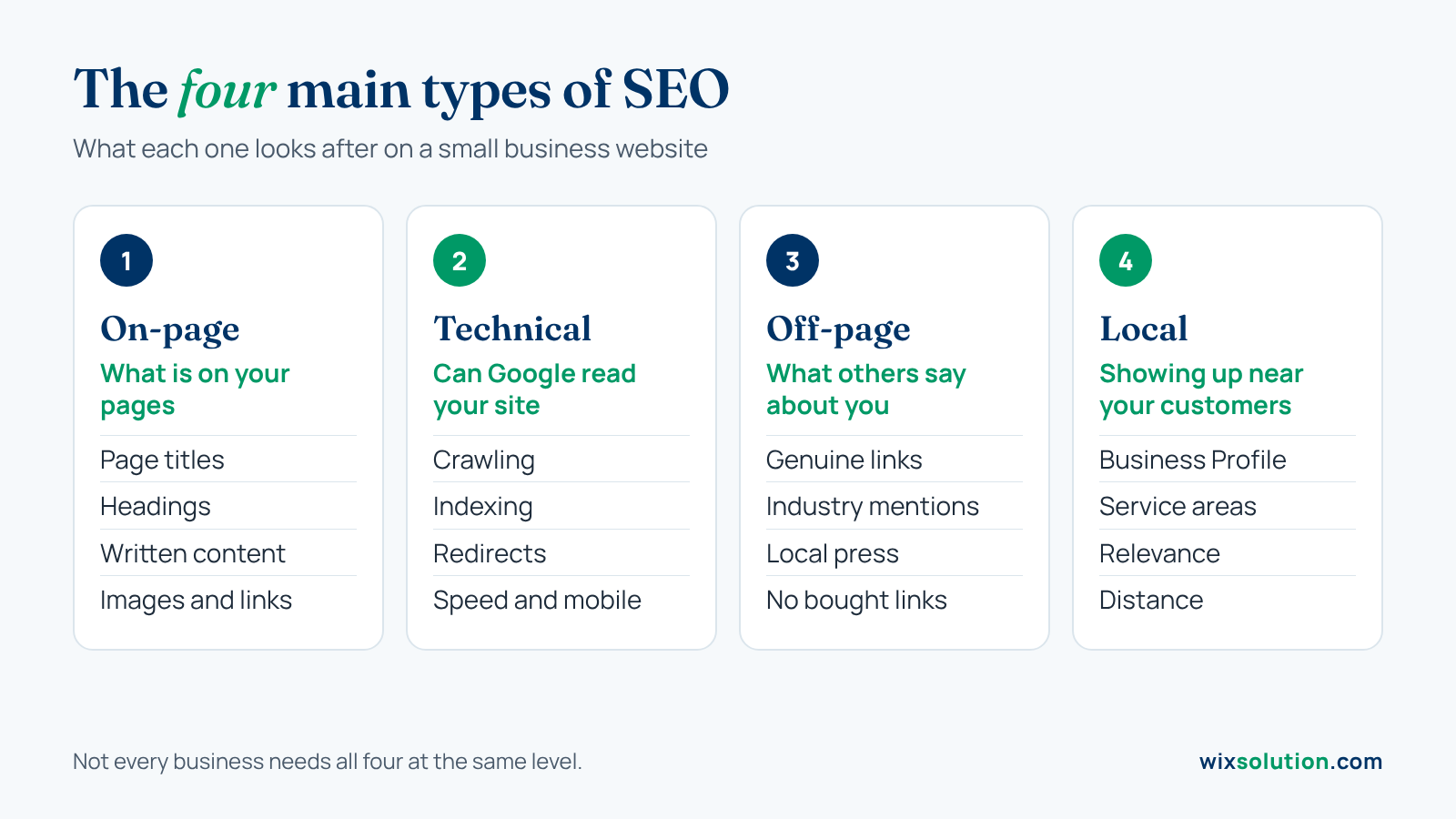
SEO includes several areas of work.
Understanding the differences can help you recognize what your website needs without becoming overwhelmed by technical terminology.
On-Page SEO
On-page SEO focuses on information and elements within your webpages.
This includes page titles, headings, written content, images, and internal links.
For example, a service page titled "Our Solutions" may not explain much about the business.
A clearer title such as "Furniture Assembly Services in Leeds" tells visitors what the page covers.
The rest of the page should support that description by explaining the actual service.
On-page SEO isn't about repeating keywords as often as possible. It's about making your content relevant, understandable, and useful.
Our on-page SEO guide for Wix websites explains how to improve these elements in detail.
Technical SEO
Technical SEO focuses on whether search engines can access, understand, and process your website.
It includes issues related to crawling, indexing, redirects, website performance, and certain technical settings.
For example, an important service page may not appear in Google because it has accidentally been marked with a noindex instruction.
In that situation, improving its content won't resolve the underlying indexing restriction.
Wix manages several technical elements automatically, but website owners still need to review their settings and identify problems when they occur.
Our technical SEO guide covers those checks separately.
Off-Page SEO
Off-page SEO involves relevant signals and activity beyond your own website.
This can include links from other websites, industry references, and information people find about your business elsewhere.
For example, a local furniture assembly company might be mentioned in a home improvement publication or recommended by a relevant professional organization.
These mentions can introduce the company to new audiences, and legitimate links may help search engines understand relationships between websites.
However, more backlinks don't automatically mean better rankings.
Buying links to manipulate search results or collecting irrelevant directory links isn't a reliable SEO strategy.
Focus on building genuine relationships and publishing information other people have a reason to reference.
Local SEO
Local SEO is especially relevant to businesses serving customers in particular locations.
It involves improving how your business appears in location-related searches, including Google Search and Maps.
For example, someone searching for "furniture assembly near me" may see nearby service providers.
Google's local results consider factors including relevance, distance, and prominence.
An eligible business can use Google Business Profile to manage information such as its services, contact details, opening hours, and service areas.
You can learn more in our local SEO best practices guide.
Not every business needs the same level of local SEO. An online-only company serving customers nationwide may have different priorities from a local plumber or restaurant.
How to Start SEO on a Wix Website
If you're new to SEO, you don't need to optimize every page immediately.
Begin with a small number of important pages and make sure they're useful to the people you want to reach.
Start With Your Most Important Service
Think about the product or service your business most wants to promote.
Then consider how a potential customer might search for it.
For a furniture assembly company, people might search for wardrobe assembly, flat-pack furniture installation, or local furniture assembly services.
These phrases can help you understand the questions and needs behind potential searches.
But don't choose keywords only because they receive a high number of searches.
A less popular query closely related to your service may be more useful than a broad topic that attracts people who are unlikely to become customers.
Check Whether Your Website Explains the Service Clearly
Open the relevant page as though you're a first-time visitor.
Can you quickly understand what the business offers?
Does the page explain the services, location, and contact process?
Are there important questions that remain unanswered?
A page that only says "We provide high-quality services at affordable prices" doesn't provide much detail.
A page explaining which furniture the company assembles, which areas it covers, and how customers request a quote is more informative.
These improvements also make your website more useful even if its search rankings don't change.
Use Wix's Built-In SEO Tools
Wix provides an SEO Setup Checklist to help website owners review basic search optimization settings.
You can access it through SEO & GEO → Tools and settings → SEO Setup Checklist in your Wix dashboard.
The checklist guides you through selected SEO tasks based on your website and business information.
Wix also supports connecting eligible websites to Google Search Console. Wix's integrated connection requires a Premium plan and a connected domain.
You can follow the current instructions in Wix's official SEO Setup Checklist guide.
For a complete walkthrough of implementing SEO on the platform, read our Wix SEO guide.
How Do You Know Whether SEO Is Working?
SEO performance shouldn't be measured by one keyword ranking alone.
Google Search Console shows how your website appears in Google Search.
You can use it to review clicks, impressions, search queries, and which pages receive visibility.
For example, if your furniture assembly page begins receiving impressions for relevant service-related searches, that may indicate Google is discovering connections between your content and those queries.
But impressions aren't the same as customers.
You'll also want to understand whether visitors contact your business, request quotes, or complete other useful actions.
Google Analytics or Wix Analytics may help you investigate what happens after visitors reach your website.
Pay attention to the results that matter to your business, not just increasing visitor counts.
What SEO Can and Cannot Do
SEO is useful, but it's important to have realistic expectations.
SEO can help your website become more discoverable for relevant searches, explain your services to potential customers, and develop a source of organic traffic.
SEO cannot guarantee first-page rankings, a particular number of customers, or immediate results.
It also can't replace a clear business offer, good customer service, or a website that visitors can use comfortably.
How Long Does SEO Take?
There's no fixed timeline.
Some changes can be reflected in Google within hours or days. Others may take several weeks or months.
A new business competing in a crowded market may require more work than an established company making a small correction to an existing page.
Google's SEO Starter Guide recommends allowing time to evaluate changes, rather than expecting immediate results.
For business owners, the important thing is to track progress and prioritize improvements that are genuinely relevant.
Is SEO Better Than Paid Advertising?
They serve different purposes.
Paid search advertising can provide visibility while a campaign is running, subject to the campaign's budget and settings.
SEO focuses on developing organic visibility without paying for each click.
Some businesses use paid advertising to reach customers while building their organic search presence.
Neither approach guarantees profitable results.
The best choice depends on your budget, business goals, competition, and how quickly you need to reach potential customers.
Does SEO Still Matter With AI Search in 2027?
Search is changing as Google introduces features such as AI Overviews and AI Mode.
People can now receive AI-generated explanations alongside links to relevant websites.
That means appearing in search results doesn't always lead to a website visit.
However, the fundamentals of SEO remain relevant.
Google's AI search documentation explains that the same core SEO practices apply to its AI features, with no special technical optimization required to appear in AI Overviews or AI Mode.
For small businesses, the sensible approach is still to provide useful information, maintain accessible webpages, and accurately describe your services.
You can explore AI visibility as part of a broader SEO strategy, but there's no guaranteed way to make an AI assistant recommend your business.
When Should You Get Professional SEO Help?
Some SEO tasks are manageable without hiring an expert.
You may be comfortable updating page content, reviewing your Wix SEO settings, or checking Google Search Console.
Other situations can be more complicated.
For example, you might have important pages that aren't indexing, an established website that has lost substantial search traffic, or several services competing for the same search queries.
In those cases, professional support may help you understand the problem and decide which work is worth prioritizing.
WixSolution provides Wix-focused services including keyword research, website audits, on-page optimization, technical SEO fixes, and local SEO support.
Our SEO Services page explains the available paid services and their scope.
If you're not sure where to begin, you can also request a free initial Wix SEO review.
The free review focuses on publicly visible SEO foundations, page and content opportunities, and practical next steps. It isn't a replacement for a full technical audit or paid implementation.
Frequently Asked Questions
Can a Wix Website Rank on Google?
Yes. Wix websites can appear in Google Search when their pages are accessible, eligible for indexing, and relevant to users' searches.
Wix provides built-in SEO features, but results depend on more than the website platform.
Is SEO Free?
Organic listings don't involve paying Google for each click, but SEO work can involve costs for content, research, tools, technical improvements, and maintenance.
Do Small Businesses Really Need SEO?
SEO can be useful when potential customers search online for your products, services, or related information.
Its priority depends on your business model, audience, and marketing goals.
Can SEO Guarantee More Customers?
No. SEO can help people discover your website, but inquiries and sales depend on factors such as customer needs, your offer, competition, pricing, and the website experience.
Conclusion
SEO helps people find and understand your business through search engines.
For a small business, the best starting point is to make important pages clear, keep your website accessible, and monitor whether you're reaching relevant customers.
If you'd like to take the next step, explore our Wix SEO guide or learn more about WixSolution's SEO services.


